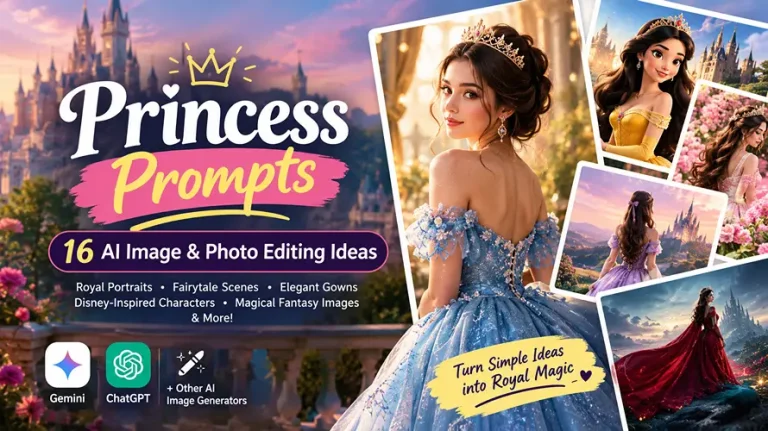
Princess Prompts: 16 AI Image & Photo Editing Ideas
Princess prompts help you turn ordinary photos or simple ideas into royal portraits, fairytale scenes, elegant gown edits, Disney-inspired characters, magical fantasy images, and cinematic princess photos. With Gemini, ChatGPT, and other AI image generators, you can create these looks by describing the dress, environment, lighting, pose, camera style, and overall mood.
For photo editing, upload a clear reference image and explicitly tell the AI to preserve the person’s identity. For text-to-image generation, describe the character and scene from scratch. The prompts below are designed for both approaches and can be adapted for Instagram posts, Stories, profile pictures, birthday photos, wallpapers, and creative projects. For more styles beyond princess portraits, explore the full collection of AI photo editing prompts on the EditPrompts homepage.
Best Princess Prompts for Gemini, ChatGPT & AI Image Generators
The strongest princess prompts combine visual details rather than simply saying “make me a princess.” Think gowns, crowns, castles, gardens, forests, cinematic lighting, realistic skin, camera framing, and specific aspect ratios. Tap View Full Prompt to expand any box, then Copy Prompt to grab it in one tap.
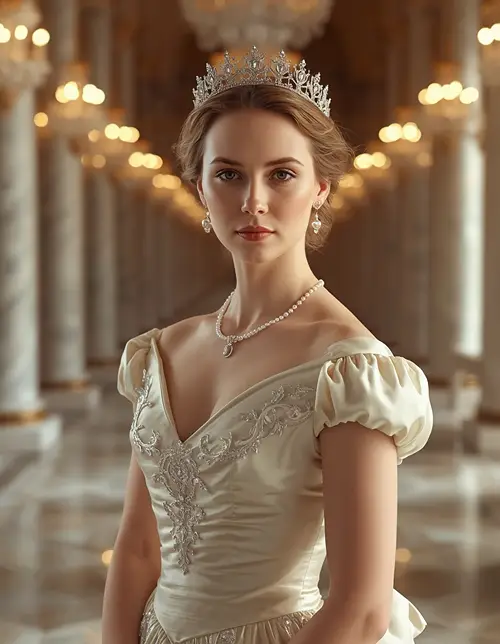
1. Classic Royal Princess Portrait
ROYAL PORTRAIT
An ivory satin ballgown in a grand European palace with chandelier bokeh.
Create a photorealistic royal princess portrait using the uploaded reference photo as the exact identity source. Preserve the person’s facial structure, recognizable features, skin tone, natural asymmetry, pores, fine facial texture, and hairstyle without beautification or reshaping. Dress her in an elegant ivory satin ballgown with embroidered sleeves, a delicate crystal tiara, and subtle pearl jewelry, standing inside a grand European palace with marble columns and soft chandelier bokeh. Use warm directional key light at 45 degrees with gentle golden rim light, an 85mm lens at f/1.8, natural depth of field, realistic fabric folds and reflections, graceful posture, calm confident expression, cinematic editorial photography, 4:5 portrait. No plastic skin, distorted face, extra fingers, malformed hands, duplicated limbs, text, logo, watermark, or identity change.
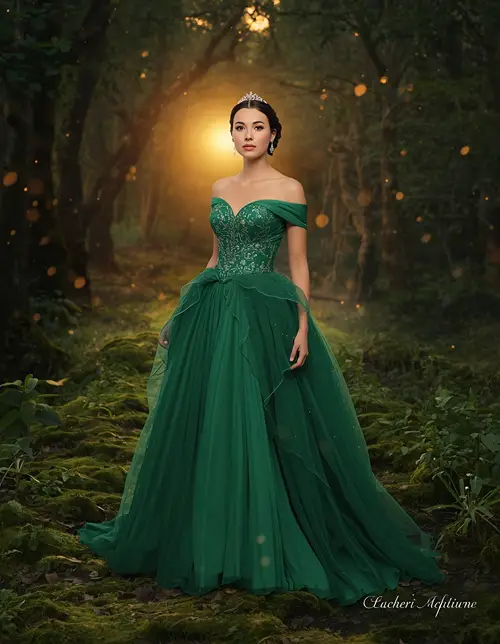
2. Enchanted Forest Princess
ENCHANTED FOREST
An emerald silk-and-tulle gown on a misty, moss-covered forest path.
Transform the uploaded photo into a realistic enchanted-forest princess while keeping the exact face, skin tone, facial proportions, hairline, eyes, nose, lips, and recognizable features unchanged. Dress her in a flowing emerald-green gown made from layered silk and translucent tulle, with delicate floral embroidery and a small silver crown. Place her on a moss-covered forest path surrounded by ancient trees, tiny glowing particles, wildflowers, and soft mist. Use warm sunset light filtering through the trees from behind, subtle golden rim lighting, cool ambient shadows, a 50mm f/1.8 lens, three-quarter framing, shallow natural bokeh, realistic hair strands, fabric texture, leaves, moss, and atmospheric depth. Preserve natural pores and minor imperfections; no artificial beauty filter, plastic skin, anatomy errors, extra fingers, text, watermark, or face alteration.
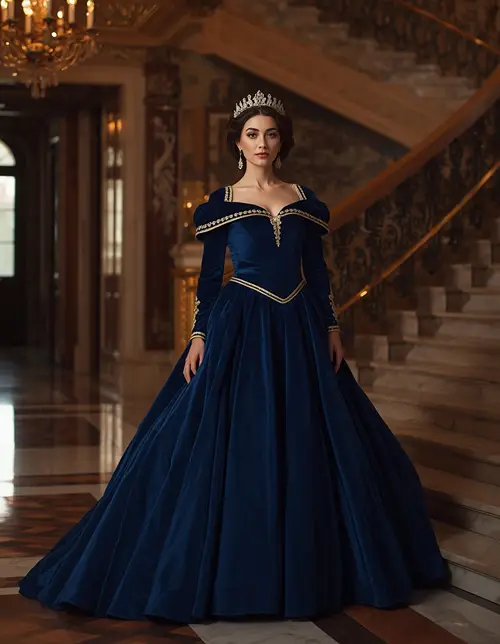
3. Luxury Palace Princess
LUXURY PALACE
A royal-blue velvet gown beside an ornate marble staircase.
Use the uploaded image as the only facial identity reference and preserve the exact face, natural skin texture, facial asymmetry, hair, and body proportions without changing identity. Create a sophisticated princess wearing a deep royal-blue velvet gown with a structured bodice, embroidered gold details, long sleeves, and a jeweled crown. Place her beside an ornate palace staircase with polished marble floors, gold railings, tall windows, and soft chandelier reflections. Use warm 3200K interior lighting, a soft directional key light from the left, subtle rim light around the hair, an 85mm lens at f/2, eye-level camera angle, full-body editorial composition, realistic velvet texture, physically accurate shadows, and cinematic contrast. No over-smoothed skin, distorted hands, extra limbs, unrealistic fabric, text, logos, watermark, or identity changes.
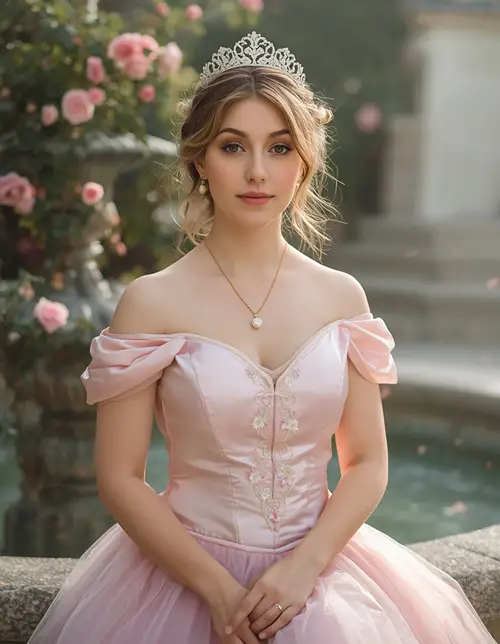
4. Princess Garden Portrait
GARDEN PRINCESS
A pastel pink gown beside a stone fountain in a misty palace rose garden.
Edit the reference photo into a graceful princess portrait while keeping the original face completely recognizable, including facial structure, skin tone, pores, subtle imperfections, natural asymmetry, and hairstyle. Give her a pastel pink gown with a fitted satin bodice, layered tulle skirt, floral embroidery, and a delicate pearl tiara. Place her in a palace rose garden beside a stone fountain with climbing roses and soft morning mist. Use diffused daylight from the upper left, gentle fill light, natural green ambient tones, an 85mm f/1.8 lens, waist-up framing, soft background compression, realistic flower petals, skin texture, hair strands, satin reflections, and natural shadows. Calm expression and relaxed shoulders. No beauty smoothing, plastic skin, distorted face, extra fingers, duplicate objects, text, watermark, or logo.
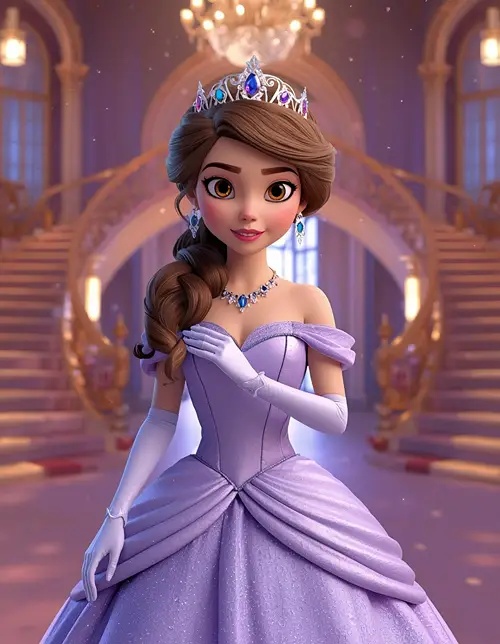
5. Disney-Inspired 3D Princess
3D FAIRYTALE
A polished storybook-animation princess in a glowing castle hall.
Transform the uploaded photo into a polished 3D animated princess while keeping the person’s recognizable facial identity, face shape, skin tone, eyes, nose, lips, and distinctive features consistent. Use a sophisticated fairytale animation aesthetic rather than a generic cartoon appearance. Give her a flowing lavender gown with subtle sparkle, a jeweled crown, elegant gloves, and softly styled hair. Place her inside a glowing castle hall with curved staircases, floating magical particles, warm chandelier light, and cool blue ambient fill. Use cinematic three-point lighting, a 50mm virtual lens, medium portrait framing, realistic cloth simulation, detailed hair strands, expressive but natural eyes, polished 3D materials, and 4:5 composition. Retain slight natural facial asymmetry; avoid plastic skin, exaggerated eyes, malformed hands, extra fingers, duplicate limbs, text, watermark, or identity distortion.
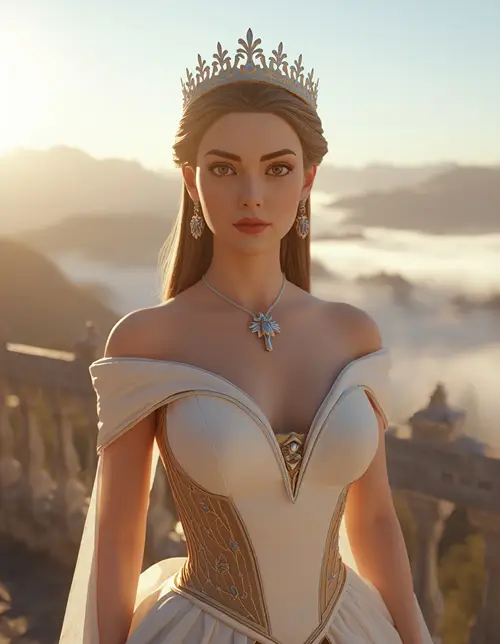
6. Modern 3D Princess at a Castle
MODERN 3D
A contemporary white-and-gold gown on a castle balcony at sunrise.
Create a modern cinematic 3D princess from the uploaded reference image, preserving the exact recognizable face and natural skin characteristics without changing facial proportions. Style her in a contemporary white-and-gold gown with sculpted fabric, subtle metallic embroidery, a minimal crown, and elegant jewelry. Place her on a massive castle balcony overlooking mountains and clouds at sunrise. Use soft warm sunlight from behind, cool blue ambient fill from the front, golden rim light around the shoulders, a virtual 35mm lens, low-angle perspective, wide cinematic composition, realistic cloth folds, detailed stone surfaces, atmospheric haze, and high-quality 3D rendering. Keep the expression confident and natural. No cartoon distortion, artificial symmetry, plastic face, malformed hands, extra fingers, text, watermark, or unwanted logo.
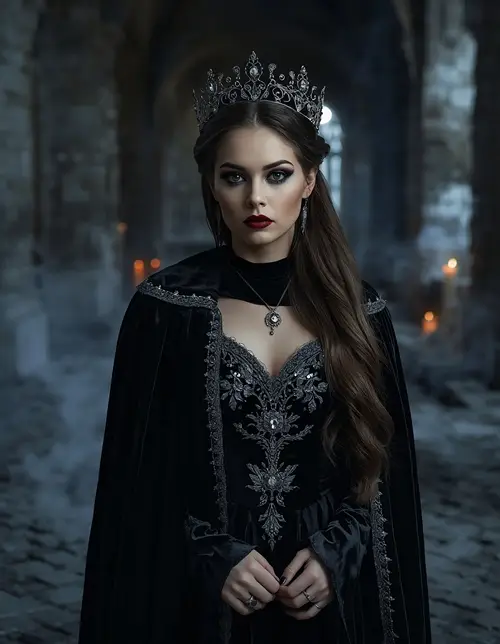
7. Dark Fantasy Princess
DARK FANTASY
A black velvet gown and cape in a candlelit, moonlit gothic ruin.
Turn the reference image into a dark fantasy princess portrait while preserving the person’s exact facial identity, skin tone, natural pores, fine lines, subtle asymmetry, and recognizable features. Dress her in a black velvet gown with antique silver embroidery, a dark jeweled crown, and a flowing cape. Place her inside a ruined gothic castle surrounded by candles, mist, old stone arches, and faint moonlight. Use cool blue moonlight as the main ambient source with a warm candle key light from the right and a subtle silver rim light, photographed with an 85mm f/1.4 lens and shallow depth of field. Create realistic velvet, stone, metal, smoke, and skin textures with dramatic cinematic contrast. No face alteration, plastic skin, excessive smoothing, extra fingers, malformed anatomy, text, logo, or watermark.
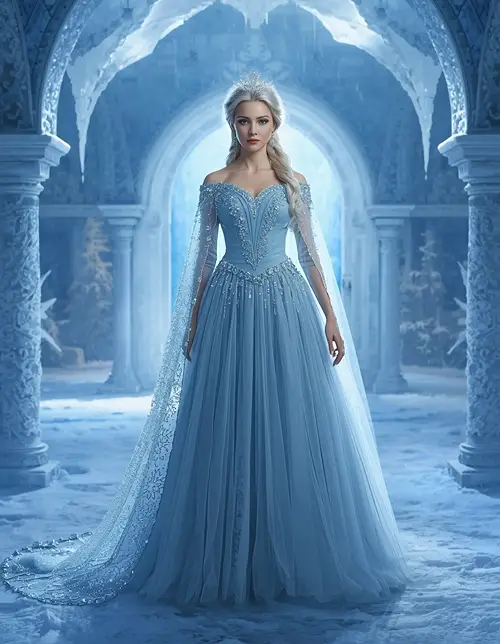
8. Ice Queen Princess
ICE PRINCESS
A silver-blue crystal-beaded gown in a frozen palace courtyard.
Create an ultra-realistic ice-queen princess using the uploaded photo as the exact identity reference. Preserve the original face, skin tone, facial structure, pores, natural imperfections, hairstyle, and recognizable features without beautification. Dress her in an icy silver-blue gown constructed from translucent layers of tulle, crystal beadwork, and a flowing cape, with a delicate frost crown. Place her in a frozen palace courtyard surrounded by snow-covered arches and crystalline structures. Use cool 6500K blue ambient light, soft frontal fill, bright icy rim lighting from behind, an 85mm f/1.8 lens, full-body portrait framing, realistic snow, frost, crystal reflections, breath vapor, and fabric texture. Natural expression and relaxed pose. No artificial skin, distorted face, extra fingers, duplicate body parts, text, watermark, or logo.
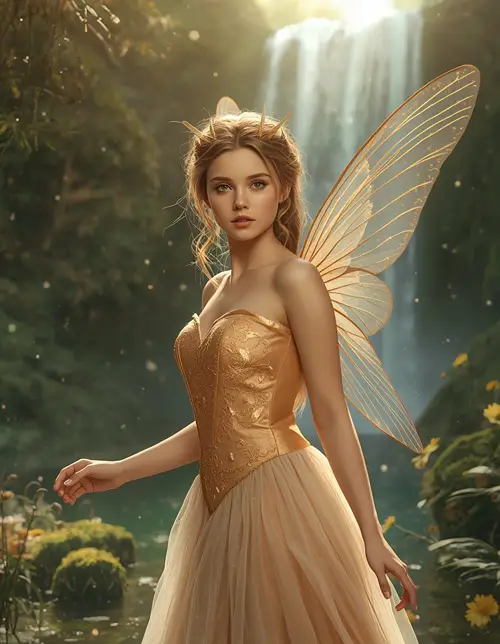
9. Fairy Princess With Wings
FAIRY PRINCESS
A peach-and-gold gown with transparent veined wings beside a magical waterfall.
Edit the uploaded image into a realistic fairy princess while keeping the exact face, facial proportions, skin tone, natural pores, minor imperfections, hairstyle, and recognizable identity unchanged. Dress her in a soft peach-and-gold gown with delicate embroidery and translucent layered fabric, then add elegant transparent wings with subtle natural veining. Place her beside a magical waterfall in a lush forest filled with flowers, moss, floating particles, and light mist. Use warm sunlight from behind at a low angle, soft green ambient fill, a 50mm f/1.8 lens, three-quarter composition, realistic water reflections, individual hair strands, detailed wings, physically accurate shadows, and cinematic depth. Keep the pose graceful rather than stiff. No plastic skin, face distortion, extra fingers, malformed wings, duplicate limbs, text, logo, or watermark.
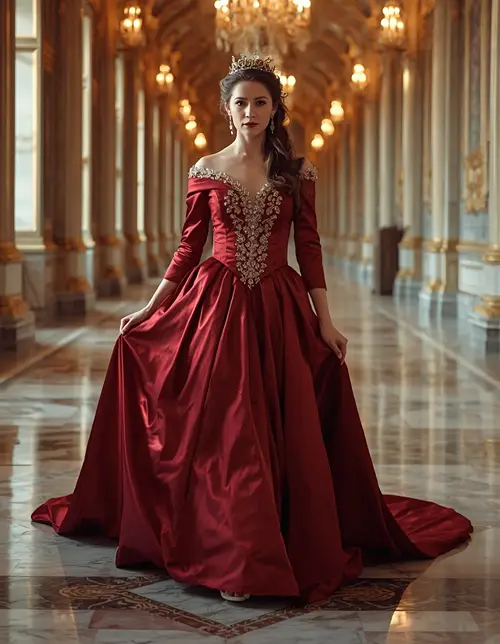
10. Princess Walking Through a Palace
PALACE WALK
A burgundy satin gown with a long train in a marble palace corridor.
Use the uploaded photo as the identity source and keep the face, skin tone, facial structure, natural texture, hairstyle, and body proportions unchanged. Create a cinematic full-body scene of the woman walking naturally through a magnificent palace corridor wearing a burgundy satin princess gown with a long flowing train, embroidered bodice, and small jeweled crown. Capture one foot naturally forward and one hand lightly holding the skirt. Use warm window light from the left, soft chandelier fill, golden highlights on the gown, a 35mm f/2 lens, eye-level perspective, subtle motion in the fabric, realistic marble reflections, and deep background perspective. Preserve natural skin texture and imperfections. No frozen pose, malformed feet, extra fingers, distorted face, duplicated body parts, text, logo, or watermark.
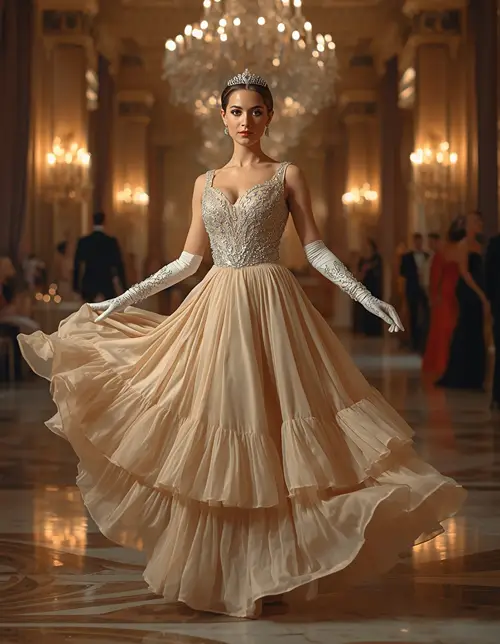
11. Princess at a Royal Ball
ROYAL BALL
A champagne-gold chiffon gown in a mid-dance pose under chandeliers.
Create a luxurious royal-ball portrait from the uploaded reference photo while preserving the exact facial identity, skin tone, pores, facial asymmetry, hairstyle, and recognizable features. Dress her in a champagne-gold gown with layered chiffon, crystal embroidery, elegant gloves, and a delicate tiara. Place her in a grand ballroom filled with chandeliers, polished marble floors, tall curtains, and softly blurred guests in the distance. Show her in a natural mid-dance pose with the skirt gently flowing. Use warm candlelight at approximately 3000K, subtle backlighting, a 35mm f/1.8 lens, dynamic full-body composition, realistic motion in the dress but a sharp face, detailed embroidery, natural shadows, and cinematic color grading. No motion blur on the face, extra limbs, malformed hands, plastic skin, text, watermark, or identity change.
12. Princess by the Sea
COASTAL PRINCESS
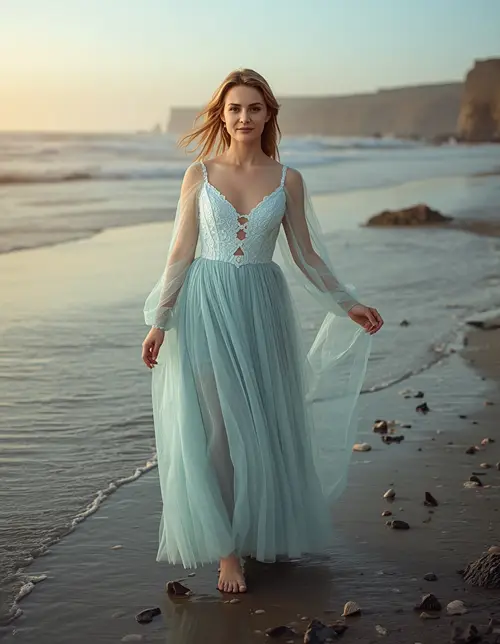
A seafoam chiffon gown near a quiet shoreline at a pastel sunset.
Transform the reference photo into a coastal fairytale princess while keeping the exact face, natural skin texture, hair, facial structure, and identity intact. Dress her in a seafoam-blue gown made from flowing chiffon with pearl embroidery and a lightweight translucent cape. Place her barefoot near a quiet shoreline with gentle waves, distant cliffs, seashells, and a pastel sunset. Use warm golden-hour backlight, soft reflected light from the water, subtle cool blue ambient fill, a 70mm lens at f/2.8, full-body framing, realistic wind movement in the dress and hair, natural wet sand reflections, physically accurate water, and cinematic atmospheric depth. Keep the expression peaceful and authentic. No plastic skin, face alteration, extra fingers, malformed feet, duplicate objects, text, logo, or watermark.
13. Princess Birthday Photo for a Girl
BIRTHDAY PRINCESS
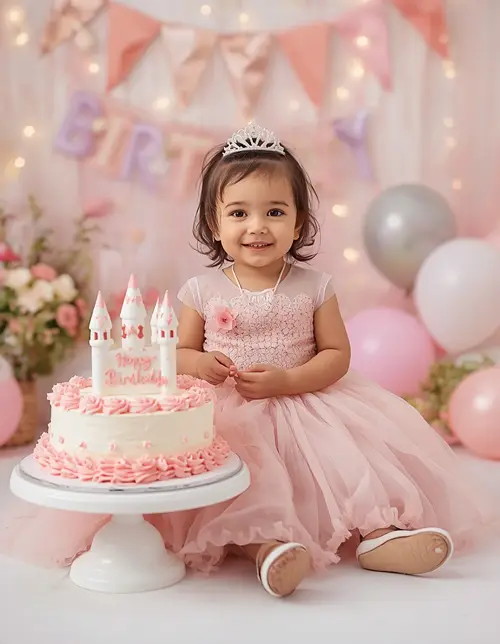
A wholesome, age-appropriate studio scene with a castle-shaped cake.
Create a wholesome, age-appropriate princess birthday portrait using the uploaded reference photo as the identity source. Preserve the child’s recognizable facial features, natural skin tone, pores, subtle imperfections, hair, and expression without beautification or reshaping. Dress her in a soft pink princess gown with tasteful sparkle, a small tiara, and comfortable ballet-style shoes. Place her beside a castle-shaped birthday cake, pastel balloons, flowers, and warm fairy lights in a clean decorated studio. Use large softbox lighting from the front-left with gentle warm fill, an 85mm f/1.8 lens, full-body 4:5 composition, realistic cake frosting, fabric texture, natural shadows, and a joyful but natural smile. No adult styling, distorted face, extra fingers, malformed hands, text, watermark, logo, or identity change.
14. Baby Princess Fairytale Portrait
BABY PRINCESS
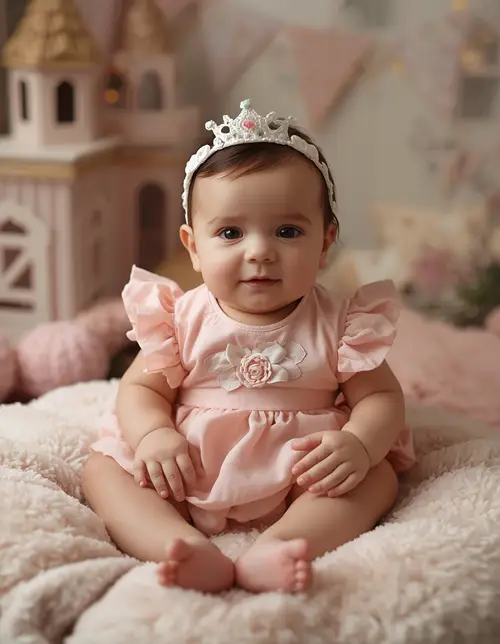
A gentle pastel nursery portrait with a tiny fabric crown, seated safely.
Create a gentle fairytale portrait of the baby using the uploaded reference image as the exact identity source. Preserve the baby’s natural facial proportions, skin tone, fine skin texture, hair, expression, and recognizable features without smoothing or reshaping. Dress the baby in an age-appropriate soft pastel princess outfit with a tiny fabric crown, seated safely on a plush decorative cushion inside a whimsical nursery designed like a miniature palace. Use soft diffused window light from the left, warm ambient fill, a 50mm f/2 lens, close portrait framing, shallow natural depth of field, realistic cotton and velvet textures, soft blankets, and subtle golden bokeh. Keep the scene wholesome and natural. No adult makeup, exaggerated features, plastic skin, unsafe pose, distorted hands, extra fingers, text, logo, or watermark.
15. Princess Instagram Story Portrait
INSTAGRAM STORY
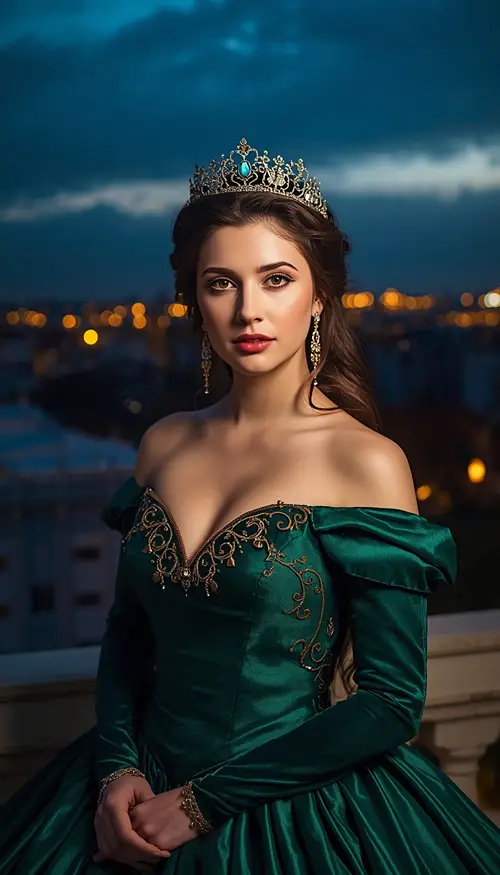
An emerald gown on a palace balcony at blue hour, framed 9:16.
Transform the uploaded photo into a cinematic princess portrait designed specifically for an Instagram Story. Keep the exact facial identity, skin tone, natural pores, facial structure, hairstyle, and recognizable features unchanged, with no beautification or artificial symmetry. Style the subject in a dramatic emerald-green gown with gold embroidery and a refined crown. Place her on a palace balcony at blue hour overlooking glowing city lights. Use a warm golden rim light behind her, cool blue ambient light from the sky, a directional key light at 45 degrees, an 85mm f/1.8 lens, vertical 9:16 composition, elegant three-quarter pose, realistic fabric movement, natural skin texture, atmospheric haze, and cinematic contrast. Leave clean negative space around the upper and lower frame for optional social-media layout. No text, watermark, logo, face distortion, plastic skin, extra fingers, or duplicated limbs.
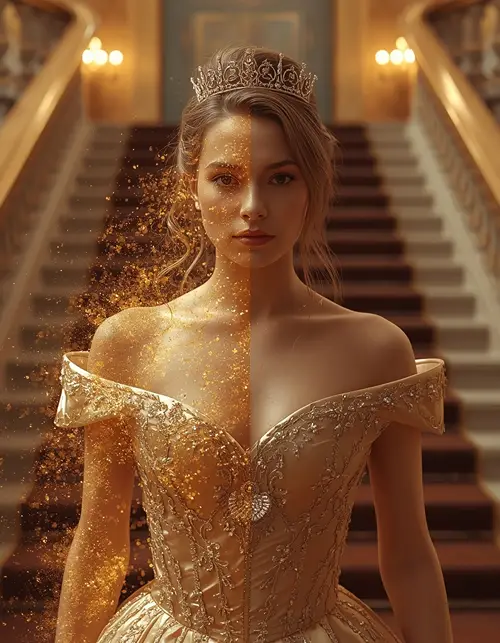
A modern outfit becoming a royal gown through flowing golden particles.
Create a cinematic transformation image using the uploaded reference photo as the exact identity source. Preserve the same face, facial structure, skin tone, hairline, natural pores, minor imperfections, and recognizable characteristics throughout the transformation. Show the subject transitioning from a simple modern outfit into an elegant royal princess gown, with the visual transformation represented by flowing golden particles around the body. Use a grand palace staircase as the environment, warm directional light from the left, golden rim lighting, subtle cool ambient shadows, a 35mm f/2 lens, dynamic vertical 4:5 framing, realistic fabric movement, detailed embroidery, physically accurate particle lighting, natural hair strands, and cinematic depth. Keep the face sharp and unchanged. No duplicated person, distorted anatomy, extra fingers, plastic skin, text, watermark, or logo.
Princess Prompt Ideas for Different Styles
The most useful way to customize princess prompts is to change one visual layer at a time instead of rewriting the entire prompt. Palace interiors, gardens, forests, ice environments, libraries, beaches, modern fashion settings, and 3D animation are all easy swaps. Try these combinations:
Period gown + film grain + warm historical palette
How to Make Better Princess Prompts
A detailed prompt does not need to be complicated for the sake of being complicated. The important information is the subject, clothing, environment, lighting, pose, camera perspective, realism, and output format.
For photo edits, start with the identity instruction. A useful formula is:
For example, tell the image generator exactly what should remain unchanged before describing what should be transformed. Specify fabric, lighting, camera language, framing, and realistic textures rather than relying on generic words such as “beautiful” or “high quality.”
Gemini or ChatGPT With a Reference Photo
Upload a clear photo where the face is visible.
State that the uploaded image is the identity reference.
Describe the princess dress and environment.
Specify the lighting and camera composition.
Add natural texture and anatomy instructions.
Choose the aspect ratio for your intended platform.
Generate the image and refine only the parts that need correction.
For example, if the face looks different, do not rewrite everything. Ask the AI to strengthen identity preservation. If the dress looks artificial, specify the fabric, construction, seams, folds, and physically realistic lighting.
For Instagram Posts and Stories
Use 4:5 for most portrait posts and 9:16 for Stories or vertical video-oriented artwork. A 1:1 composition works well for square profile graphics, while 16:9 is more appropriate for landscape scenes.
For More Realistic Results
Avoid stacking too many contradictory styles. “Photorealistic,” “cartoon,” “oil painting,” and “3D animation” describe different visual goals. Choose one dominant rendering direction and then support it with appropriate lighting, materials, camera language, and composition.
Princess Video and Story Prompts
Princess concepts can also be extended from still images into short videos and character-driven stories. AI video platforms support princess characters in scenes, with options for movement, dialogue, and story sequences. For video, describe movement in addition to the image details:
Subject + action + camera movement + environment movement + lighting + duration/style
Bonus: Princess Video Prompt
VIDEO PROMPT
A slow marble-staircase walk with gentle tracking and natural cloth movement.
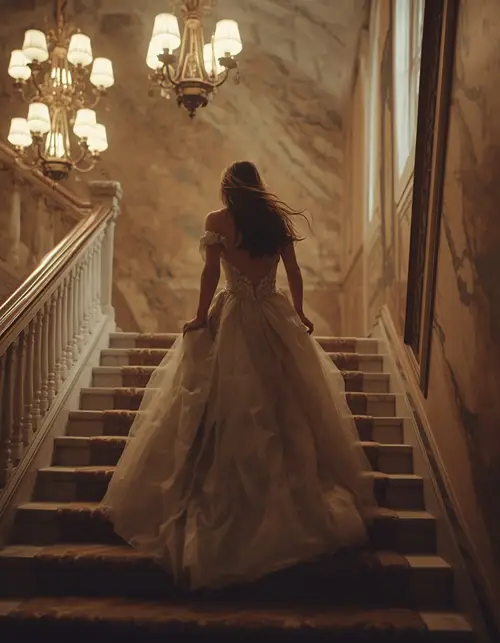
A princess slowly walks down a marble staircase while her gown moves naturally with each step, the camera performs a gentle forward tracking movement, chandelier lights flicker softly, her hair moves slightly in the evening breeze, cinematic fantasy photography, realistic cloth physics, natural facial movement.
For writing or story generation, princess prompts can instead focus on plot hooks, characters, magical kingdoms, conflicts, and world-building. Those are useful secondary applications, but they serve a different intent from image-generation prompts.
Common Problems With AI Princess Images
The face does not look like the original: strengthen the identity-preservation instruction and use a clearer reference image.
Skin looks too smooth: request visible pores, fine hairs, natural texture, subtle asymmetry, and realistic imperfections.
The dress looks plastic: specify the actual material, such as satin, velvet, silk, chiffon, lace, or layered tulle, and describe how light interacts with it.
Hands look distorted: use a waist-up composition, gloves, a bouquet, or another natural prop when hands are not the main subject.
The image feels too cartoonish: specify realistic photography, natural skin, physically accurate lighting, realistic materials, and a real camera/lens perspective.
The composition feels crowded: simplify the background and ask for shallow depth of field or a cleaner environmental arrangement.
Frequently Asked Questions
What are princess prompts used for?
Princess prompts are instructions for generating or editing royal, fairytale, fantasy, animated, or princess-themed images with AI. They can be used for personal portraits, social posts, birthday images, creative artwork, and storytelling visuals.
Can I use princess prompts in Gemini?
Yes. Gemini can be used for text-based image creation and photo-editing workflows where available. For a personal transformation, upload a clear reference photo and explicitly describe which facial characteristics should remain unchanged.
Can I use these prompts in ChatGPT?
Yes. The prompts are written as general image-generation instructions and can be adapted for ChatGPT and other AI image tools. You may need to adjust the aspect ratio or style terminology depending on the generator.
How do I create a Disney-style princess image?
Describe the visual characteristics you want—storybook animation, expressive character design, elegant gown, magical environment, cinematic lighting, or polished 3D rendering—rather than relying only on a character name. For personal edits, include a clear identity-preservation instruction.
Which princess prompt is best for Instagram?
A 4:5 portrait is useful for standard Instagram feed posts, while a 9:16 vertical composition is better suited to Stories. Use strong subject separation, a clean background, realistic lighting, and a visually distinctive gown.
Can AI create princess images from my own photo?
Yes. Image-editing systems can use an uploaded photo as a reference and transform the clothing, environment, lighting, and visual style. For better consistency, clearly state that the original facial identity should remain unchanged.
Can I make a princess birthday photo for a child?
Yes. Use age-appropriate clothing, wholesome props, soft lighting, natural expressions, and safe compositions. Avoid adult makeup or mature styling and keep the scene focused on the birthday or fairytale theme.
Can princess prompts generate 3D images?
Yes. Add terms such as polished 3D character rendering, physically realistic materials, detailed cloth simulation, cinematic lighting, expressive facial features, and high-quality environmental textures when a 3D look is desired.
Conclusion
The best princess prompts combine a clear visual concept with identity preservation, realistic materials, controlled lighting, natural posing, camera language, and an appropriate aspect ratio. Instead of using a short instruction such as “make me a princess,” describe the gown, setting, atmosphere, pose, lens, lighting, and texture you want.
You can use the 16 copy-paste prompts above as starting points and then swap the dress color, environment, crown, mood, camera angle, or visual style to create an almost unlimited range of royal portraits. Whether you want a realistic palace portrait, fantasy fairy, 3D character, birthday image, dark queen, ice princess, or Instagram Story, detailed princess prompts give the AI a much clearer visual direction.