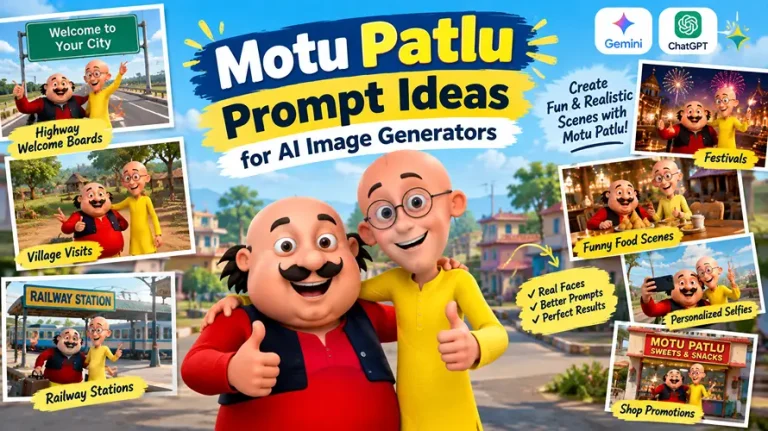
A good motu patlu prompt is the difference between a flat, pasted-on cartoon edit and a scene that actually looks like Motu and Patlu are standing in your city, village, or shop. If you’ve typed something vague like “put Motu Patlu on my highway photo” into Gemini or ChatGPT and gotten back characters with warped faces or six fingers, the problem isn’t the tool — it’s the prompt. Most people writing a motu patlu prompt skip the details that actually control how AI image generators handle character consistency, lighting, and environment, so the tool fills in the gaps with its own guesses.
This guide breaks down exactly how to write prompts that keep Motu and Patlu looking like themselves, work across Gemini, ChatGPT, and similar AI image tools, and cover the specific scenes people search for most — highway welcome boards, village visits, railway stations, festivals, funny food scenes, personalized selfies, and shop promotions.
What Makes a Motu Patlu Prompt Actually Work
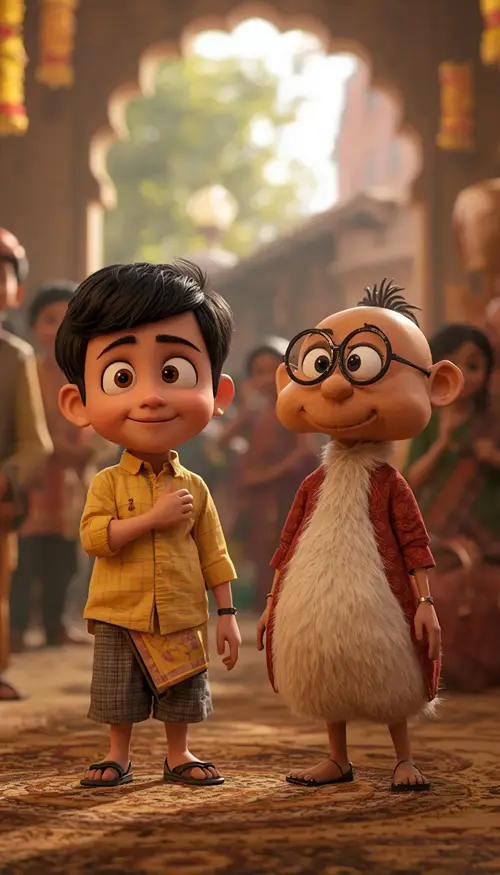
A motu patlu prompt is a written instruction you give an AI image generator, using an uploaded character reference, to place Motu and Patlu into a new scene — a location, a festival, a shop, or a personalized moment. The quality of the output depends almost entirely on how specific the prompt is.
Generic prompts produce generic, broken results. AI models default to warping hands, duplicating limbs, and pasting the characters flatly onto the background unless you explicitly describe lighting, perspective, and texture. That’s why every prompt in this article is written as a full, technical instruction rather than a short idea — mismatched shadows, extra fingers, and plastic-looking cartoon skin are the biggest complaints people have with AI-generated Motu Patlu scenes.
A prompt that works consistently across Gemini, ChatGPT’s image tool, and other generators needs eight components:
Character-reference instruction — telling the model to keep Motu and Patlu’s recognizable faces, proportions, clothing, and colors exactly as in the uploaded reference
Pose and action clause — one clear, simple action per character (pointing, waving, holding a cup)
Environment detail — road, village, market, or landmark elements described physically, not just named
Lighting direction and color temperature — where the light comes from and how warm or cool it is
Camera and lens language — like 35mm or 50mm — to push the image toward realistic photography
Texture realism — how fabric, dust, water, food, or skin should physically behave
Aspect ratio — matched to Reels, feed posts, or posters
Avoid-clauses — negative instructions ruling out common AI errors like extra fingers or watermarks
How to Write a Motu Patlu Prompt for Any AI Tool
Whether you’re using Gemini, ChatGPT, or another AI image generator, the process is nearly identical:
Upload a clear Motu and Patlu reference image — a clean, front-facing reference gives the AI the most character data to preserve.
State the location or occasion first — “highway welcome board,” “village visit,” “railway station,” etc.
Add the technical clauses listed above, in one continuous paragraph rather than bullet points — models read flowing prompts more coherently than fragmented lists.
Specify the aspect ratio for where you’ll post it — 9:16 for Reels and Shorts, 4:5 for feed posts.
Generate, then refine — if the characters change too much between generations, add “match character design precisely to uploaded reference” and regenerate.
This same structure works whether you’re editing in Gemini, editing in ChatGPT, or trying another generator — only small wording tweaks change between tools, while the character-reference, lighting, and negative-instruction clauses stay the same.
Motu Patlu Copy-Paste Prompt:
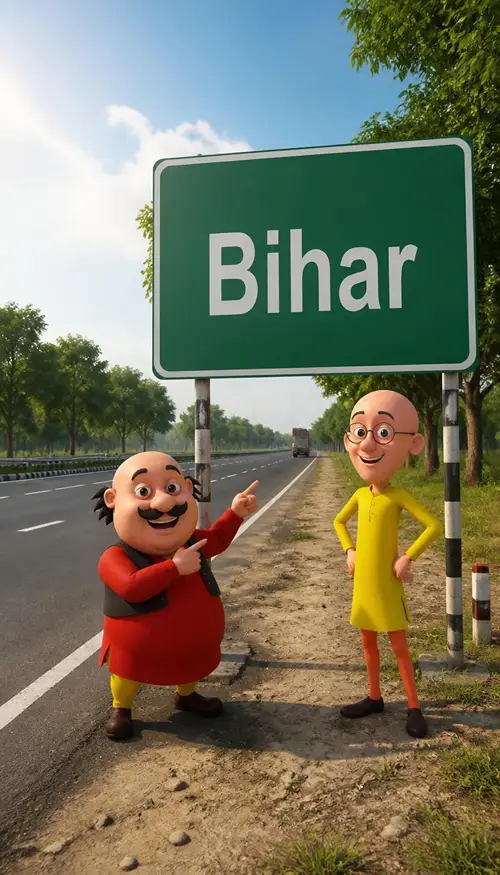
Indian Highway Welcome Board
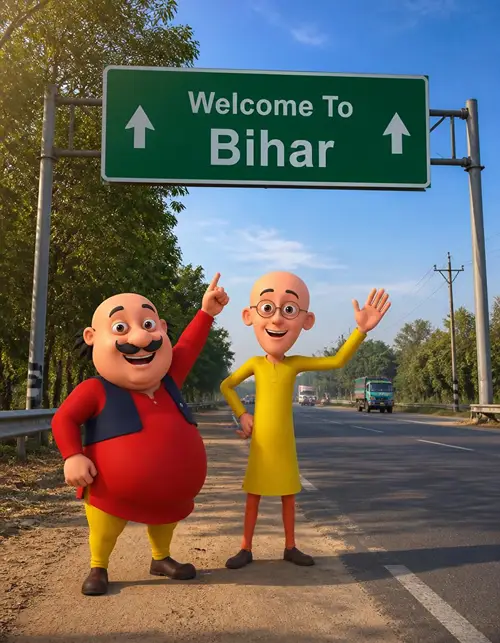
Use the uploaded Motu and Patlu reference image as the character reference and preserve their recognizable facial features, body proportions, clothing colors, expressions, and original cartoon appearance consistently. Create a cinematic vertical 9:16 scene of Motu and Patlu standing together beside a clean Indian highway underneath a large green welcome sign showing “[YOUR CITY OR STATE]”. Motu smiles and points toward the sign while Patlu stands beside him with one hand raised in a friendly greeting. Add realistic Indian road markings, roadside trees, distant vehicles, utility poles, subtle dust in the atmosphere, and a natural blue sky. Use warm directional daylight from the upper left with soft contact shadows and gentle rim light around the characters. Render with a 35mm equivalent perspective, natural depth of field, detailed fabric, clean cartoon textures, realistic environmental surfaces, and cinematic color balance. Keep the characters consistent and avoid distorted anatomy, extra fingers, duplicated limbs, altered faces, plastic textures, excessive smoothing, random people, unwanted logos, watermarks, and unreadable text.
Motu Patlu Prompt Ideas by Location
Location is what most people search for first — a village welcome scene, a famous landmark, or a busy railway station. Here’s how to adjust your motu patlu prompt for the most-requested places.
Village Welcome Prompt
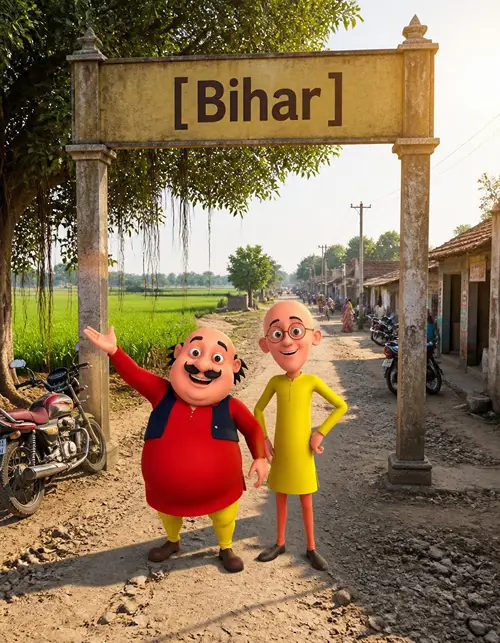
Village scenes are easy to personalize because you can change the village name, road, houses, fields, and time of day while keeping the main character composition stable.
Use the uploaded character reference to maintain Motu and Patlu’s recognizable appearance, proportions, clothing, expressions, and cartoon style. Create a realistic Indian village welcome scene in vertical 9:16 where Motu and Patlu stand beneath a large entrance board displaying “[YOUR VILLAGE NAME]”. Surround them with a narrow village road, mud-plastered houses, green agricultural fields, motorcycles, banyan trees, small local shops, electric poles, and a few distant villagers. Motu looks excited and gestures toward the village while Patlu smiles naturally toward the camera. Use soft morning sunlight from the right at approximately 45 degrees, subtle warm ambient light, realistic shadows, atmospheric depth, and a 35mm documentary-style perspective. Make soil, walls, clothing, foliage, and road surfaces physically detailed rather than smooth or plastic. Preserve character consistency and avoid malformed hands, extra fingers, duplicated people, distorted faces, artificial skin, excessive saturation, watermarks, unwanted logos, and random text.
Famous Landmark Prompt (India Gate, Hawa Mahal, and Similar)
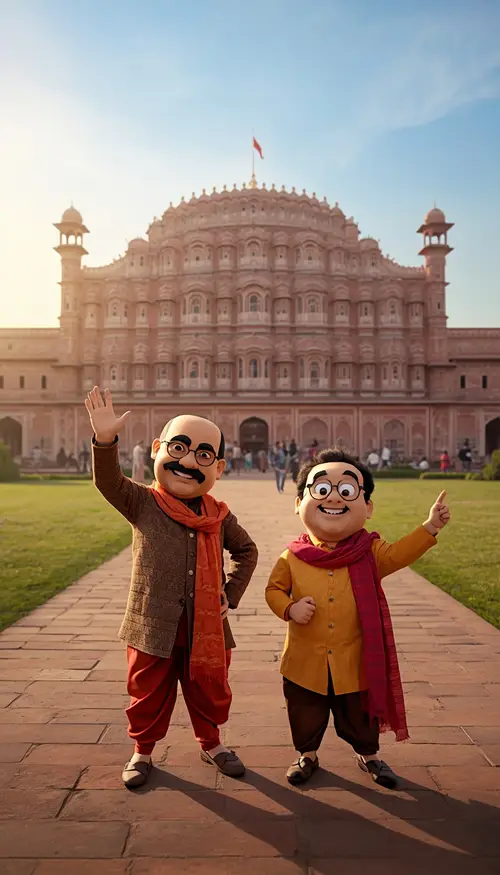
Use the uploaded Motu and Patlu image as the character reference and keep their recognizable appearance, proportions, clothing, colors, and expressions consistent. Create a premium travel photograph of Motu and Patlu standing in front of “[LANDMARK NAME]” in a vertical 9:16 composition. Motu waves happily toward the camera while Patlu points toward the monument with an excited expression. Include realistic pathways, green lawns, distant visitors, subtle atmospheric details, and authentic architectural detail. Use late-afternoon sunlight from the left with warm golden highlights and soft blue ambient fill from the sky. Capture the scene with a 50mm lens look, moderate depth of field, realistic perspective, natural shadows, detailed costume textures, and cinematic but believable colors. Avoid distorted anatomy, extra limbs, duplicate characters, changed faces, artificial surfaces, excessive blur, fake text, logos, and watermarks.
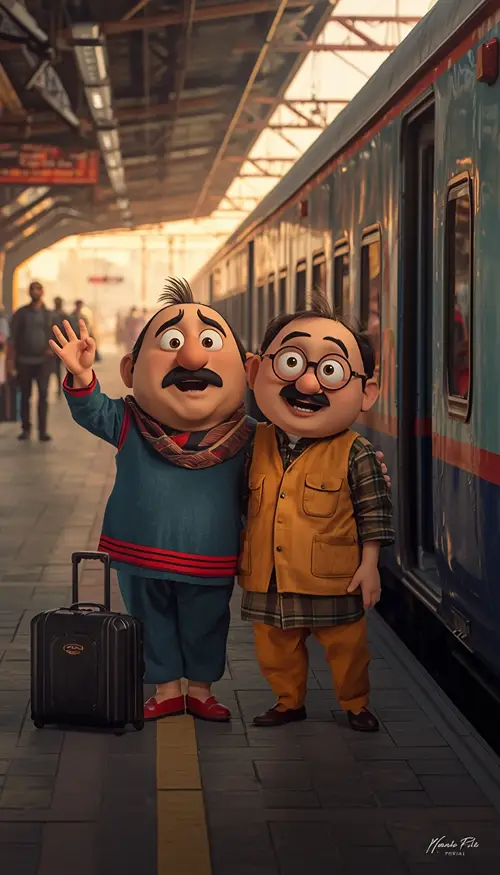
Railway Station Vlog Prompt
Use the uploaded Motu and Patlu reference image and preserve their recognizable character design, clothing, body proportions, expressions, and colors. Create a vertical 9:16 cinematic railway-station scene where Motu and Patlu stand together on a busy modern Indian platform beside a contemporary passenger train. Motu holds one hand up as if introducing the journey while Patlu adjusts his round glasses and smiles toward the camera. Include realistic luggage, platform tiles, overhead lighting, passengers in the distant background, railway infrastructure, train reflections, and subtle atmospheric haze. Use a 35mm lens perspective, cool station ambient lighting mixed with warm sunlight entering from one side, realistic reflections, accurate shadows, and detailed metal and fabric textures. Keep the characters sharp while giving the background natural depth. No malformed hands, extra fingers, duplicated characters, face changes, unrealistic reflections, excessive smoothing, watermarks, logos, or random readable text.
Funny and Comedy Scene Prompts
Motu’s love of samosas is the most searched comedy angle for this duo. Keep the joke in one clear action — reaching, laughing, or reacting — instead of stacking multiple gags into one image.
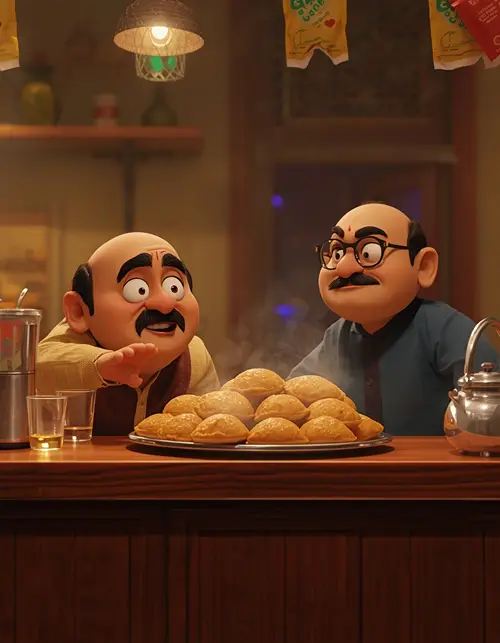
Samosa Comedy Prompt
Preserve the uploaded Motu and Patlu character references, including recognizable facial features, clothing, body proportions, colors, and expressions. Create a humorous cinematic scene in a small Indian tea-and-snacks shop where Motu eagerly reaches toward a large plate of hot samosas while Patlu gently stops him with an amused expression. Include a realistic wooden counter, stainless-steel kettle, tea glasses, steam rising from the food, hanging snack packets without readable branding, and a warm neighborhood atmosphere. Use warm 3200K practical lighting from the shop interior combined with soft daylight from the doorway, realistic steam diffusion, natural contact shadows, and a 50mm lens perspective. Give the characters expressive but believable poses and detailed material textures. Avoid malformed hands, extra fingers, duplicated food, distorted faces, plastic-looking surfaces, fake logos, watermarks, and unnecessary text.
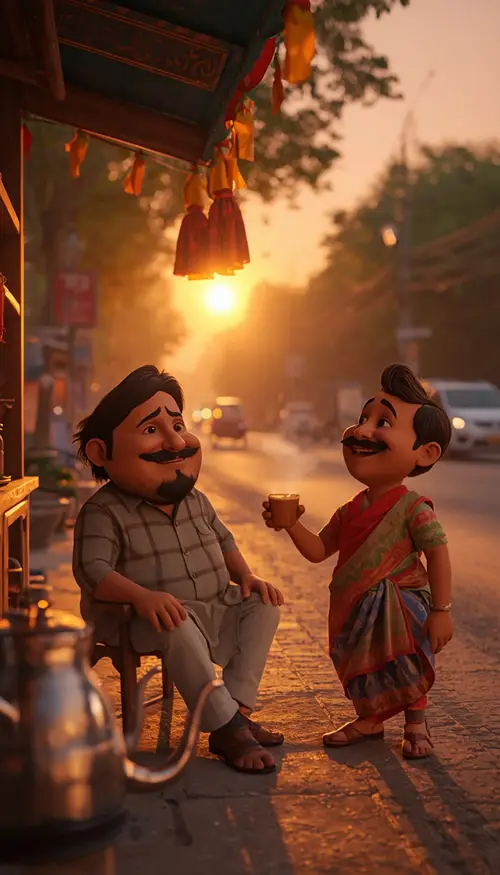
Roadside Tea Stall Prompt
Use the uploaded Motu and Patlu reference as the fixed character design and preserve their recognizable appearance, clothing, colors, proportions, and expressions. Create a realistic Indian roadside tea stall at sunset with Motu sitting on a small wooden bench holding a steaming glass of chai while Patlu stands beside him laughing. Add a stainless-steel kettle, small clay cups, a wooden counter, roadside trees, parked bicycles, and distant traffic. Use warm sunset light from behind at a low 25-degree angle, soft golden rim light, cool blue ambient fill, realistic steam, and natural contact shadows. Frame the scene vertically in 9:16 with a 50mm lens look and moderate background blur. Preserve detailed metal, wood, fabric, and skin-like cartoon textures. Avoid malformed hands, extra fingers, distorted faces, duplicate objects, plastic surfaces, logos, watermarks, and unwanted text.
Festival and Celebration Prompts
Festival scenes lean on warm practical lighting and physically believable effects — powder, confetti, or diyas — rather than an artificial glow layered on top of the characters.
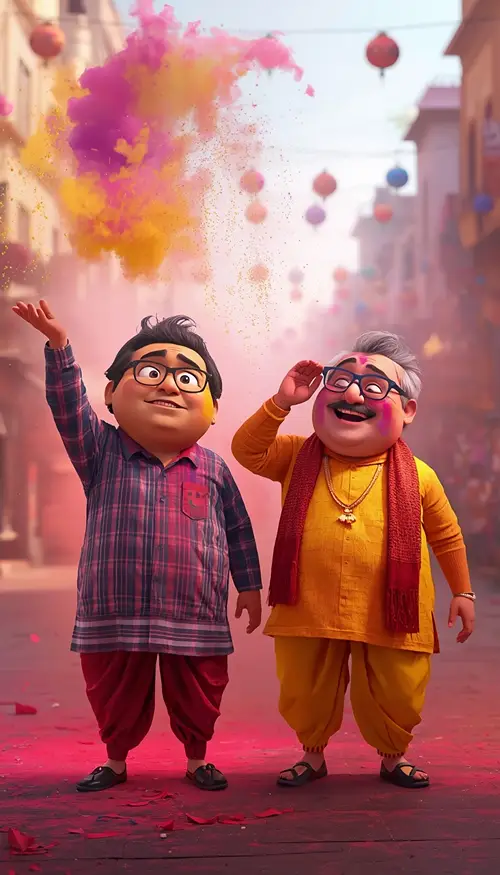
Holi Celebration Prompt
Preserve the uploaded Motu and Patlu reference, including recognizable character appearance, clothing, body proportions, and facial expressions. Create an energetic but family-friendly Holi celebration in vertical 9:16. Motu throws a cloud of colorful powder into the air while Patlu laughs and protects his glasses with one hand. Add realistic colored powder particles, decorated streets, distant celebrants, soft sunlight, and colorful environmental details. Use strong daylight from the upper left, subtle warm rim light, realistic atmospheric scattering through the powder, and a 35mm lens perspective with moderate depth of field. Make the powder physically believable and keep the characters visually consistent. Avoid deformed hands, extra fingers, distorted faces, duplicated limbs, excessive saturation, muddy textures, watermarks, logos, and text.
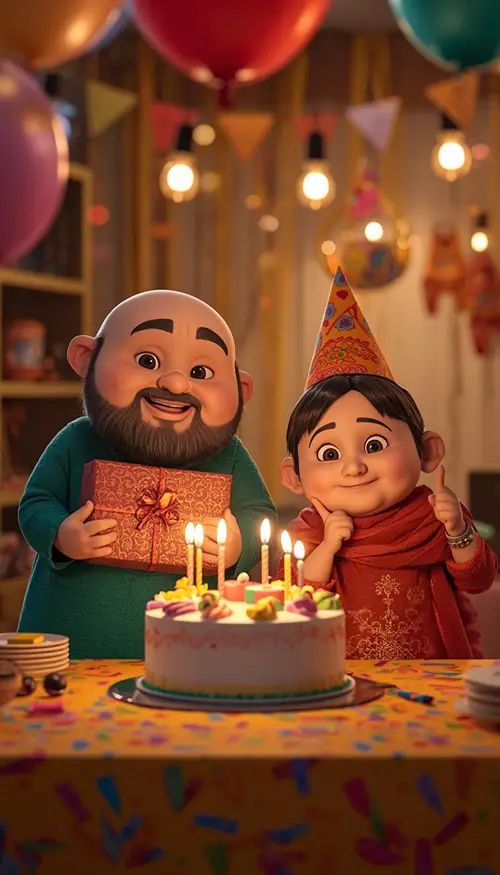
Birthday Celebration Prompt
Use the uploaded Motu and Patlu character reference and maintain recognizable facial features, clothing, proportions, colors, and cartoon styling. Create a cheerful vertical 9:16 birthday celebration where Motu and Patlu stand beside a decorated cake on a colorful indoor party table. Motu holds a wrapped gift while Patlu points toward the cake with a playful smile. Add balloons, paper decorations, warm fairy lights, colorful confetti, realistic cake frosting, and soft background bokeh. Use warm 3200K indoor lighting from overhead practical lamps with a gentle softbox-style key light from the front-left. Use a 50mm lens perspective, realistic depth of field, detailed fabric and paper textures, and natural shadows. Leave a clean area for optional text added later. Avoid malformed hands, extra fingers, distorted faces, duplicate balloons, artificial skin, excessive smoothing, logos, watermarks, and generated text.
Personalized and Social-Media Prompts
When a real person is added to the scene alongside Motu and Patlu, identity preservation for the human matters just as much as character consistency for the cartoons — never let one instruction crowd out the other.
Your Name Welcome Board Prompt
Use the uploaded Motu and Patlu character reference and preserve their recognizable appearance, clothing, body proportions, colors, and expressions. Create a vertical 9:16 personalized roadside photograph where Motu and Patlu stand beside a large clean welcome board displaying “[YOUR NAME]”. Motu points toward the board while Patlu smiles at the camera. Place them on a realistic Indian highway with trees, road markings, distant vehicles, and a bright sky. Use natural daylight from the upper left, soft shadows, subtle rim lighting, and a 35mm lens perspective. Make the sign surface realistic and leave the requested name as the only intentional text element. Preserve detailed materials and natural environmental depth. Avoid misspelled text, random lettering, extra signs, face distortion, malformed hands, extra fingers, duplicated characters, logos, watermarks, and artificial textures.
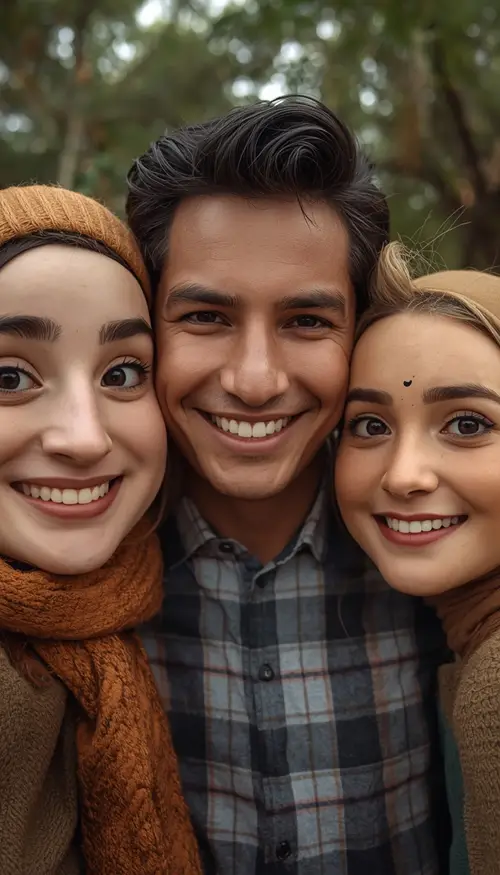
Selfie With a Human Prompt
Use the uploaded human portrait as the only identity reference for the person and preserve their facial structure, skin tone, hairstyle, natural asymmetry, pores, subtle imperfections, and recognizable features without beautification or identity changes. Use the uploaded Motu and Patlu reference for the cartoon characters and keep their recognizable appearance consistent. Create a realistic vertical 9:16 selfie photograph where the person stands between Motu and Patlu as if they are close friends. All three smile naturally toward the camera. Use soft outdoor daylight from the upper left, realistic contact shadows between the characters and person, a 35mm smartphone-style perspective, natural depth of field, detailed hair strands, fabric texture, and realistic integration of the cartoon characters into the scene. Avoid face replacement, plastic skin, artificial symmetry, extra fingers, malformed hands, duplicate bodies, distorted faces, logos, watermarks, and text.
Shop Promotion and Poster Prompts
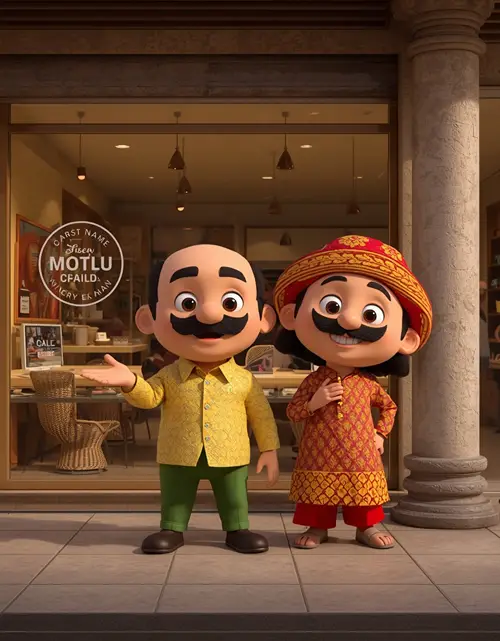
For business use, keep the storefront branding area clean in the prompt and add the actual shop name and offers afterward in an editor — this avoids the misspelled or garbled text AI generators often produce on signage.
Use the uploaded Motu and Patlu character reference and preserve their recognizable appearance, clothing, proportions, colors, and expressions. Create a professional vertical 4:5 promotional image showing Motu and Patlu standing outside a clean Indian neighborhood shop or showroom. Motu gestures toward the storefront while Patlu gives a friendly welcoming pose. Use a realistic shop exterior, product displays, glass reflections, clean pavement, subtle customers in the distant background, and a visually organized commercial composition. Use soft directional daylight from the front-left with warm interior lighting visible through the storefront, realistic shadows, a 50mm lens perspective, detailed glass, metal, fabric, and wall textures. Keep the storefront branding area clean so the actual business name can be added later. Avoid automatically generated business text, fake logos, watermarks, distorted characters, extra fingers, malformed hands, duplicate products, and artificial textures.
Trending Cinematic Styles
Two styles come up repeatedly in viral Motu Patlu edits: dramatic movie-poster compositions and neon-lit night scenes. When adapting any prompt above for these looks, add a clause such as “compose as a dramatic movie-poster shot with a warm low-angle key light and dust in the air” or “set at night with cool blue ambient light mixed with magenta and orange neon reflections on wet pavement” — while keeping every character-reference and negative-instruction clause intact, since trend styling should sit on top of the scene, not replace the character design.
Turning a Motu Patlu Image Into a Video
If your goal is an AI video, generate the still image first. This gives the video generator a fixed visual reference for the characters, clothing, background, and composition before any motion is added.
Use the uploaded image as the only visual reference. Keep Motu, Patlu, their clothing, recognizable appearance, facial expressions, body proportions, background, lighting, and overall composition unchanged. Animate only natural character movement: realistic Hindi lip-sync, subtle eye blinking, gentle head movement, natural breathing, small hand gestures, and believable body motion. Keep the camera stable with a very slight handheld movement. Preserve the original background without adding new people or objects. Use natural timing between speakers and maintain consistent character proportions throughout the clip. Create a smooth 8-second vertical 9:16 animation with clean motion and realistic environmental ambience. Avoid face changes, character redesign, outfit changes, background changes, flickering, duplicated limbs, distorted hands, poor lip-sync, sudden camera jumps, text, logos, and watermarks.
For Hindi dialogue, place the exact spoken lines after the animation instructions, in the format “Motu:” and “Patlu:” followed by their lines — keeping each line short so lip-sync stays accurate.
Which Prompt Should You Use — and Which Aspect Ratio
Choosing between prompts comes down to two questions: where is the scene, and where will it be posted. A Reel or Short needs 9:16; a feed post or poster works better at 4:5; a printed shop banner needs a wider format. Beyond that, match the prompt to the mood you want — playful for comedy and festivals, cinematic for landmarks and movie-poster edits, warm and documentary-style for village and travel scenes.
Use Case
Recommended Format
Instagram Reels / YouTube Shorts
9:16
Instagram portrait post
4:5
Profile-style image
1:1
YouTube thumbnail / website banner
16:9
Poster
4:5 or 2:3
Common Mistakes to Avoid
Skipping the character-reference clause — this is the single biggest cause of “Motu and Patlu look different every time” results.
Using bullet-point prompts instead of one flowing paragraph — models parse continuous prompts more reliably.
Requesting complicated hand interactions — one clear action like pointing, waving, or holding an object works far better than multi-object interactions.
Asking for long or detailed sign text — AI generators struggle with long text; keep names and boards short or add text afterward in an editor.
Forgetting aspect ratio — leads to awkward cropping on Reels or feed posts.
Frequently Asked Questions
What is a Motu Patlu prompt?
It’s a detailed text instruction for generating an AI image or scene featuring Motu and Patlu, specifying the location, pose, lighting, camera, clothing, mood, and image format using an uploaded character reference.
How do I stop the characters from changing every time?
Reuse the same reference image for every generation and explicitly request character consistency in the prompt, while avoiding changes to several visual variables at once.
Can I use these prompts in Gemini or ChatGPT?
Yes. The prompts are written in a general format that works in Gemini, ChatGPT, and similar AI image generators — just upload a reference image when character consistency matters.
Can I add my own village, city, or name to the scene?
Yes. Replace placeholders such as “[YOUR VILLAGE NAME]”, “[YOUR CITY OR STATE]”, or “[YOUR NAME]” with the location or name you want shown on the board or sign.
Can I make a talking Hindi video from the image?
Yes — a common workflow is to generate the still image first and then use that image as the reference for an image-to-video or lip-sync animation tool.
Motu Patlu ka photo banane ke liye kaunsa prompt best hai?
Scene aur platform ke hisaab se prompt choose karein — village ya highway welcome ke liye documentary-style prompt, festival ke liye warm lighting wala prompt, aur Reels ke liye 9:16 ratio wala prompt sabse best result deta hai.
Final Thoughts
The gap between a pasted-on cartoon edit and a Motu Patlu scene people actually stop scrolling for comes down to one thing: how specific your motu patlu prompt is. Skip the vague one-liners, include character-reference, lighting, lens, and negative-instruction details every time, and adjust the location or occasion details covered above — whether that’s a village welcome board, a railway station vlog, a Holi celebration, or a shop promotion poster. Once you’ve written one solid motu patlu prompt, reusing and tweaking that same structure across Gemini, ChatGPT, and other tools becomes second nature. For more character-based edits and other creative styles, explore the full collection of AI photo editing prompts on the EditPrompts homepage.