Cinematic Photo Prompt: 15+ AI Prompts for Realistic Edits
A cinematic photo prompt can turn an ordinary portrait into a realistic film-style image with dramatic lighting, natural skin texture, professional camera depth, rich colors, and a strong storytelling mood. You can use these prompts with ChatGPT, Gemini, Nano Banana, or another AI image generator to transform an existing photo or create a new cinematic scene.
The best results do not come from simply adding words such as “cinematic,” “8K,” or “movie look.” A strong prompt explains how the scene should look, how the subject should be positioned, where the light comes from, what camera and lens feel should be used, and which details must remain realistic. Current cinematic AI prompt libraries follow a similar structure, combining subject, environment, lighting, lens, depth of field, color treatment, texture, and mood.
What Is a Cinematic Photo Prompt?
A cinematic photo prompt is a detailed instruction that tells an AI image generator to create or edit an image with the visual characteristics of a movie still or professional film photograph. Instead of asking for only “a cinematic portrait,” describe the complete visual setup — for example, a soft sunset backlight, an 85mm lens, shallow depth of field, realistic skin pores, subtle film grain, muted colors, and a relaxed expression.
A useful cinematic prompt usually controls: subject and identity, pose and facial expression, location and background, lighting direction and color temperature, camera and lens, depth of field, color grading, film grain and texture, clothing and material realism, composition and aspect ratio, and negative instructions. This approach is useful for both AI photo editing and creating completely new images.
How to Create a Cinematic Photo With AI
The easiest method is to start with a clear photo and tell the AI exactly what should change and what must remain untouched.
Upload a clear reference photo. Use a reasonably sharp image where the face is visible, giving the model information about facial structure, hairstyle, skin tone, and overall appearance.
Lock the person’s identity. Tell the generator to preserve the original facial features instead of allowing it to redesign the person — especially important on Gemini or ChatGPT.
Add cinematic lighting. Lighting often creates more of the movie effect than simply adding a color filter. Specify direction, softness, intensity, and color temperature.
Add camera language. Terms such as 35mm, 50mm, 85mm, f/1.8, shallow depth of field, and realistic bokeh give the generator a clearer photographic target.
Finish with color and texture. Add a restrained film grade, realistic fabric and hair detail, subtle grain, and natural skin texture — avoid stacking too many conflicting effects.
The strongest prompt structures used by current cinematic prompt resources follow this same progression from subject and identity to lighting, lens, color, texture, and mood.
15+ Cinematic Photo Prompts for AI Editing
Below are ready-to-use prompts for portraits, men, women, couples, night photography, black and white edits, mobile photos, and Instagram content. Each prompt is written as a complete instruction so you can paste it directly into Gemini, ChatGPT, or another compatible image generator. Tap View Full Edit Prompt to expand any box, then Copy Prompt to grab it in one tap.
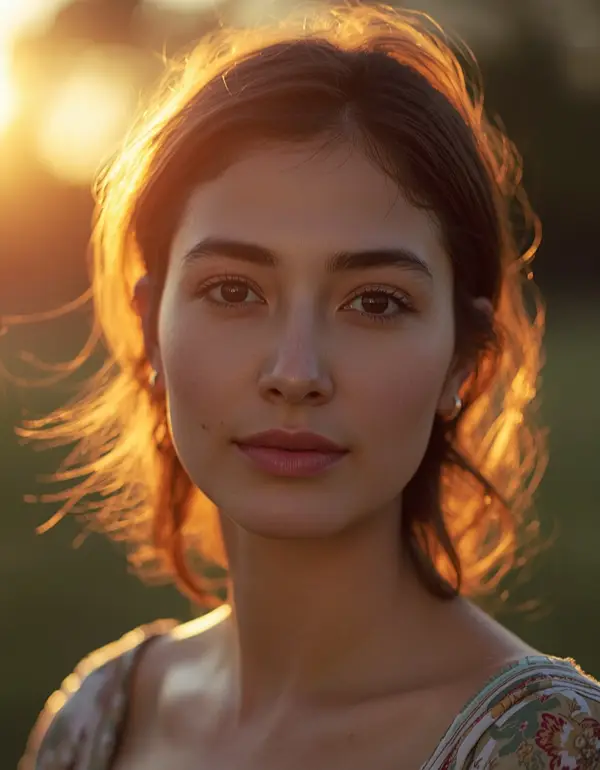
1. Golden Hour Cinematic Portrait
INSTAGRAM PORTRAITS
Best for: Instagram portraits, outdoor photography, warm aesthetic edits.
Use the uploaded photo as the exact identity reference and preserve the person’s facial structure, facial features, skin tone, hairstyle, and recognizable identity exactly as shown, with no beautification, reshaping, face alteration, age change, or identity replacement. Retain natural pores, subtle skin texture, minor imperfections, fine facial asymmetry, and realistic under-eye detail, avoiding overly smooth skin or an AI-perfect symmetrical face. Transform the scene into a cinematic golden-hour portrait outdoors, with warm sunlight coming from behind the subject at approximately a 35-degree angle creating a soft golden rim light, while a weaker natural fill comes from the front at around 5200K. Use an 85mm lens look at f/1.8 with shallow depth of field, natural optical compression, realistic background bokeh, and gentle lens flare. Keep hair strands individually detailed and make clothing fabric physically accurate with natural folds and weave texture rather than plastic surfaces. Use a relaxed three-quarter pose with a subtle natural expression, warm amber and muted green cinematic color grading, delicate film grain, realistic highlight roll-off, portrait 4:5 composition, and no extra fingers, distorted hands, duplicated facial features, artificial skin, text, logos, borders, or watermark.
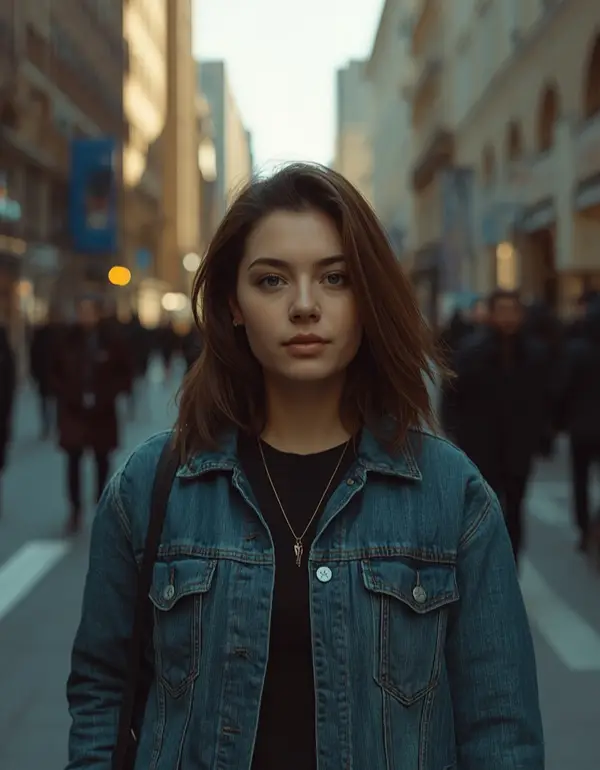
2. Cinematic Street Photography
CANDID / DOCUMENTARY
Best for: Casual portraits, photography ideas, Instagram edits.
Use the uploaded image as the exact identity reference and preserve the person’s face, skin tone, hairstyle, facial proportions, and identity without beautification or alteration. Keep natural pores, fine skin texture, minor imperfections, realistic asymmetry, and individual hair strands visible, avoiding plastic skin or an AI-perfect appearance. Place the subject walking naturally through a modern city street during late afternoon, with soft directional sunlight entering from the upper left at approximately 40 degrees and a cooler 4500K ambient fill from the buildings on the right. Create a realistic 50mm documentary photography look at f/2.0 with moderate background separation, natural perspective, subtle motion in distant pedestrians, and realistic lens rendering. Preserve physically accurate denim, cotton, leather, and hair textures with natural folds and material response. Capture a candid walking pose with relaxed shoulders and an authentic expression, using muted teal, warm skin tones, restrained contrast, subtle film grain, and cinematic highlight roll-off. Compose the image vertically in 4:5 format and avoid distorted buildings, duplicated people, malformed hands, extra fingers, artificial facial features, text, logos, or watermark.
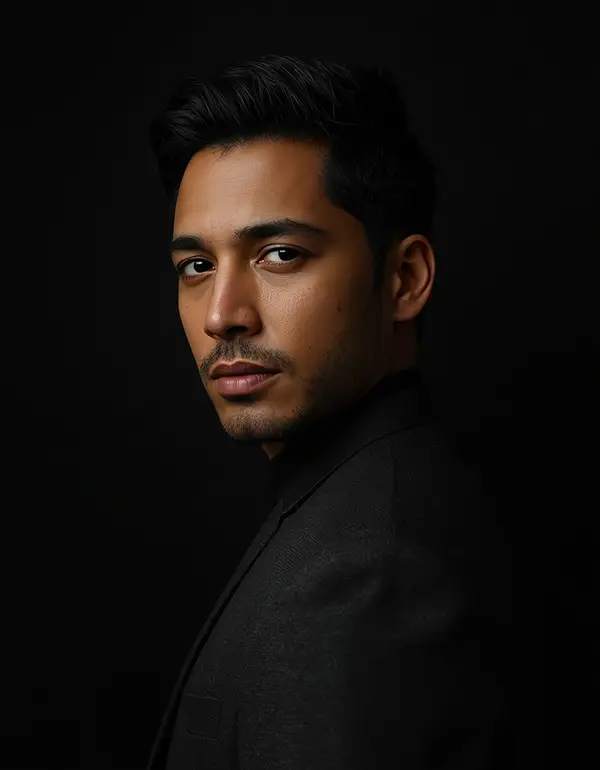
3. Dark Cinematic Male Portrait
MEN / DRAMATIC
Best for: Men, profile pictures, dramatic edits.
Use the uploaded male photo as the exact identity reference and preserve his facial features, skin tone, hairstyle, beard or natural facial hair, proportions, and identity exactly, with no beautification, reshaping, or alteration of identity. Maintain visible pores, natural skin texture, small imperfections, realistic facial asymmetry, and authentic hair detail instead of smooth AI-perfect skin. Create a dark cinematic studio portrait against a nearly black background, using a controlled hard key light positioned 45 degrees to the subject’s left at approximately 3200K, combined with a very subtle cool 5600K rim light from behind on the opposite side. Use an 85mm portrait lens at f/1.4, shallow depth of field, realistic optical falloff, and precise eye focus. Keep the jacket or shirt fabric physically realistic with visible weave and natural folds. Give the subject a calm, confident expression with a slightly turned shoulder and relaxed posture. Apply deep blacks, restrained warm highlights, subtle desaturation, fine film grain, and realistic cinematic contrast in a 4:5 portrait composition. Avoid crushed facial detail, glowing edges, plastic skin, extra fingers, malformed hands, duplicate features, text, logos, or watermark.
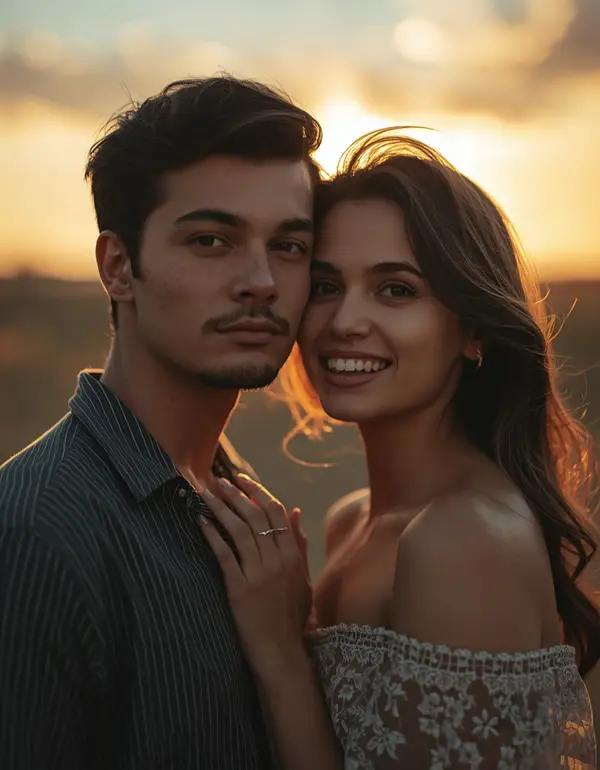
4. Cinematic Couple Portrait
COUPLES / ROMANTIC
Best for: Couple photography, anniversary posts, romantic edits.
Use both uploaded people as exact identity references and preserve each person’s facial structure, skin tone, hairstyle, natural proportions, and recognizable identity without beautification, face reshaping, or identity blending. Retain natural pores, subtle skin texture, minor imperfections, fine facial asymmetry, and realistic individual features on both subjects, avoiding overly smooth or AI-perfect skin. Create a romantic cinematic couple portrait at sunset, with warm sunlight coming from behind them at approximately 25 degrees creating a soft 5000K golden rim light and gentle natural fill from the open sky in front. Use a 50mm lens at f/1.8 with shallow depth of field, realistic optical bokeh, and natural perspective. Preserve physically accurate clothing, hair strands, fabric folds, and jewelry reflections. Pose the couple naturally with relaxed shoulders, subtle closeness, genuine eye contact, and an understated expression rather than a stiff studio pose. Use warm amber highlights, muted green shadows, subtle film grain, soft contrast, and a 4:5 Instagram composition. Do not merge faces, change identities, create extra limbs or fingers, distort hands, flatten clothing, add text, logos, or watermarks.
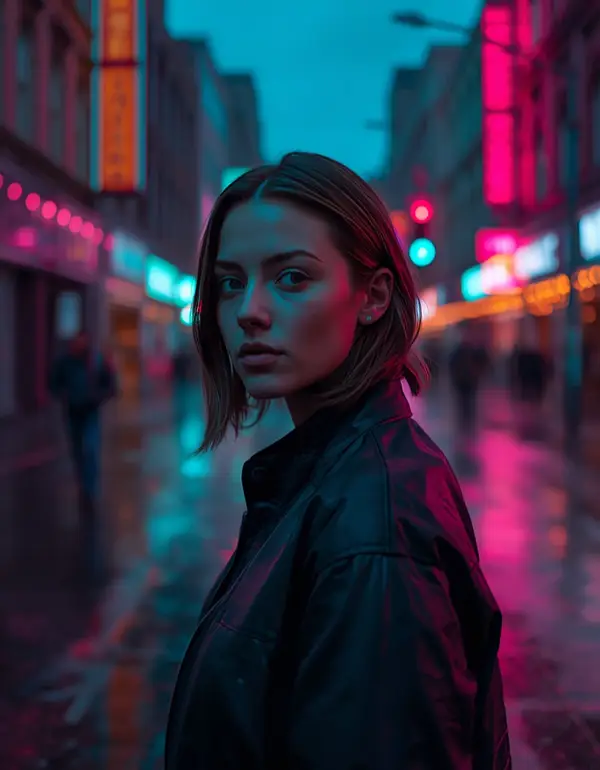
5. Night City Cinematic Photo
NIGHT / NEON
Best for: Night photography, aesthetic Instagram edits, neon effects.
Use the uploaded photo as the exact identity reference and preserve the person’s original facial features, skin tone, hairstyle, facial proportions, and identity exactly, with no beautification or alteration. Retain natural pores, subtle skin texture, minor imperfections, realistic asymmetry, and individual hair detail, avoiding plastic or AI-perfect skin. Place the subject on a wet city street at night surrounded by realistic neon signs and reflected pavement, with a magenta practical light coming from the right at approximately 3200K and a cooler cyan light from the left at approximately 5600K, creating natural mixed-color illumination across the scene. Use an 85mm lens at f/1.8 with shallow depth of field, realistic bokeh circles, controlled anamorphic-style flare, and sharp focus on the eyes. Make the jacket, hair, raindrops, and wet pavement physically detailed and realistic. Give the subject a relaxed walking pose and thoughtful expression. Use deep shadows, teal and magenta cinematic grading, subtle grain, and a vertical 9:16 composition for Instagram or short-video covers. Avoid blown highlights, unnatural neon skin, distorted hands, extra fingers, duplicate people, text, logos, and watermarks.
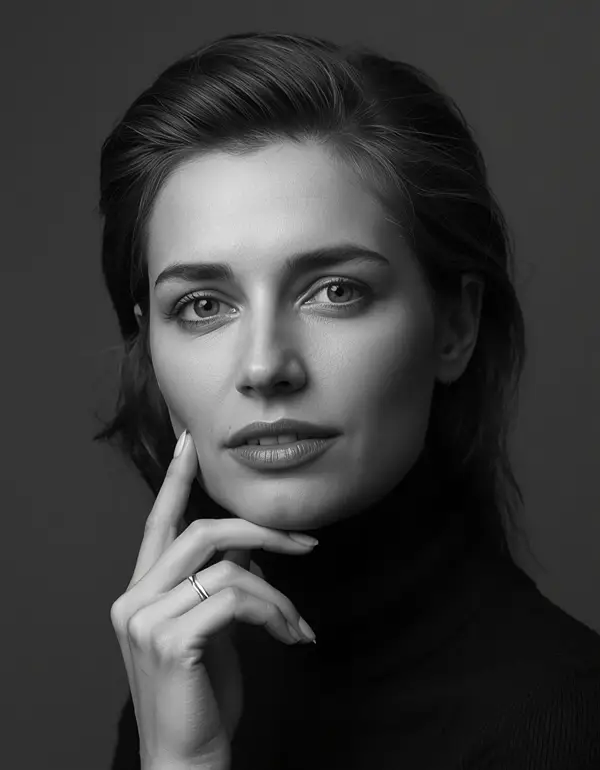
6. Black and White Film Portrait
CLASSIC / EDITORIAL
Best for: Classic photography, serious portraits, editorial images.
Use the uploaded image as the exact identity reference and preserve the person’s facial features, face shape, skin tone information, hairstyle, and identity without beautification or facial modification. Maintain natural pores, subtle skin texture, minor imperfections, facial asymmetry, and realistic hair detail so the monochrome conversion does not create an artificial face. Create a timeless black-and-white cinematic portrait using a large soft key light from the upper left at approximately 45 degrees with a neutral 5000K source and gentle shadow fill from the front. Simulate an 85mm lens at f/1.8 with shallow depth of field, natural optical compression, smooth but realistic tonal falloff, and crisp eye focus. Preserve accurate skin texture, hair strands, and fabric weave in grayscale. Pose the subject naturally with a slightly lowered chin and calm expression. Use rich blacks, controlled highlights, subtle silver-toned film grain, moderate contrast, and a 4:5 portrait frame. Avoid plastic skin, excessive sharpening, artificial symmetry, malformed hands, extra fingers, duplicated facial features, text, logos, or watermark.
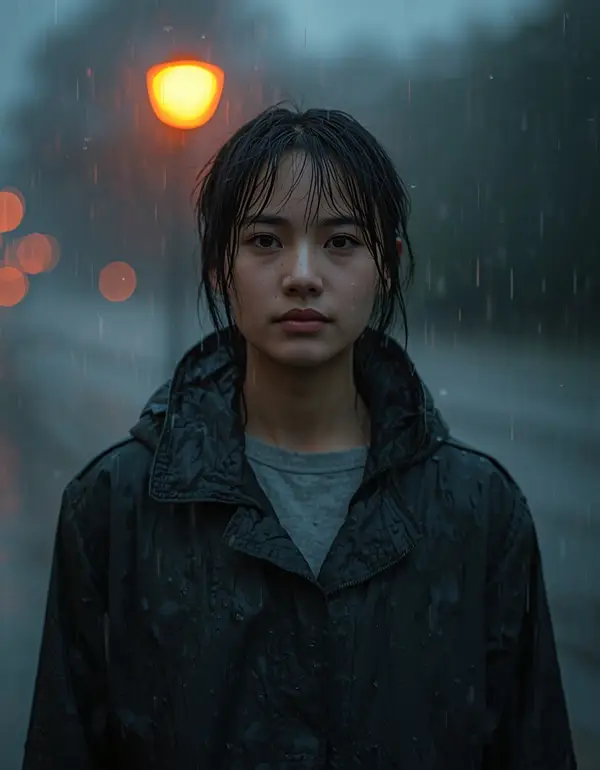
7. Cinematic Rain Portrait
MONSOON / MOODY
Best for: Monsoon photography, dramatic edits, romantic scenes.
Use the uploaded photo as the exact identity reference and preserve the person’s identity, facial structure, skin tone, hairstyle, and natural proportions exactly, with no beautification, reshaping, or identity alteration. Keep visible pores, realistic skin texture, minor imperfections, natural asymmetry, and individual wet hair strands instead of creating smooth AI skin. Create a cinematic monsoon portrait with light rain falling naturally around the subject, illuminated by a warm streetlamp positioned behind and slightly to the right at approximately 3200K, while cool overcast ambient light around 6000K softly fills the face from the front. Use an 85mm lens at f/1.8, shallow depth of field, realistic raindrop bokeh, natural lens response, and focused eyes. Make wet clothing, hair, water droplets, and pavement physically accurate with realistic reflections and fabric behavior. Give the subject a relaxed standing pose and quiet thoughtful expression. Use muted teal shadows, warm amber highlights, subtle film grain, and a 4:5 vertical composition. Avoid excessive rain, fake reflections, plastic skin, distorted hands, extra fingers, duplicate objects, text, logos, or watermark.
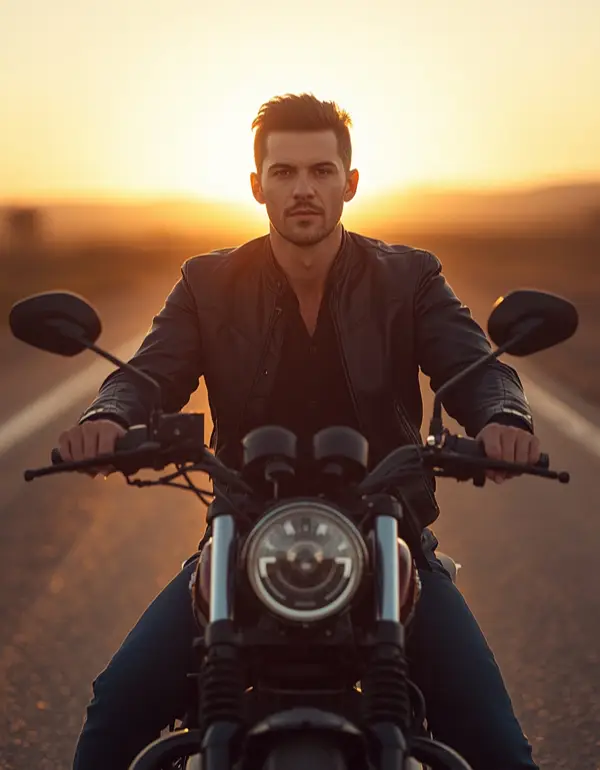
8. Cinematic Bike Portrait
BIKE / GOLDEN HOUR
Best for: Bike lovers, boys, Instagram profile images.
Use the uploaded photo as the exact identity reference and preserve the rider’s facial features, skin tone, hairstyle, body proportions, and identity exactly without beautification or alteration. Retain natural pores, minor skin imperfections, realistic asymmetry, individual hair strands, and authentic facial texture. Create a cinematic motorcycle portrait on an open road during late golden hour, with sunlight positioned behind the rider at approximately 30 degrees creating a warm 5000K rim light and soft natural fill from the sky at the front. Use a 50mm lens at f/2.0 with realistic depth of field, natural perspective, and subtle background motion blur while keeping the rider and motorcycle sharp. Preserve physically accurate leather, denim, metal, rubber, road texture, and reflections. Pose the rider naturally beside or seated on the motorcycle with relaxed posture and confident expression. Apply warm cinematic grading, subtle film grain, controlled contrast, and 4:5 composition. Avoid unrealistic motorcycle geometry, extra fingers, distorted hands, floating wheels, altered identity, artificial skin, text, logos, or watermark.
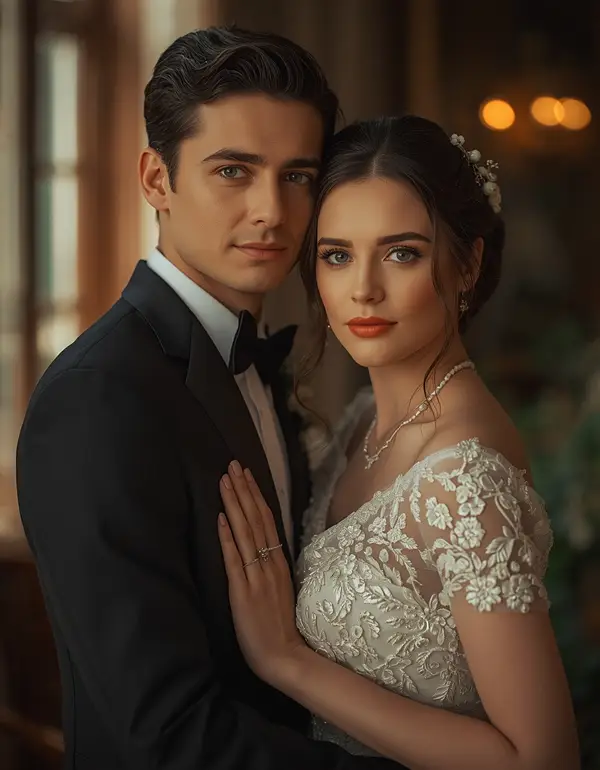
9. Cinematic Wedding Portrait
WEDDING / COUPLES
Best for: Wedding photography ideas and couple edits.
Use the uploaded wedding photo as the exact identity reference for each person and preserve facial features, skin tone, hairstyle, facial proportions, and identity exactly without beautification, reshaping, or identity blending. Maintain natural pores, subtle skin texture, minor imperfections, realistic facial asymmetry, hair strands, and authentic skin detail. Create a cinematic wedding portrait inside an elegant venue with soft warm window light entering from the left at approximately 45 degrees around 5200K, supplemented by subtle warm practical lights around 3000K in the background. Use an 85mm lens at f/1.8 with shallow depth of field, realistic bokeh, natural compression, and precise eye focus. Make the wedding clothing, embroidery, jewelry, flowers, and fabric folds physically accurate with detailed material texture. Pose the couple naturally with gentle eye contact and relaxed hands. Use warm ivory highlights, muted shadows, subtle film grain, soft cinematic contrast, and 4:5 composition. Avoid changing faces, merging identities, distorted jewelry, malformed hands, extra fingers, artificial fabric, text, logos, or watermark.
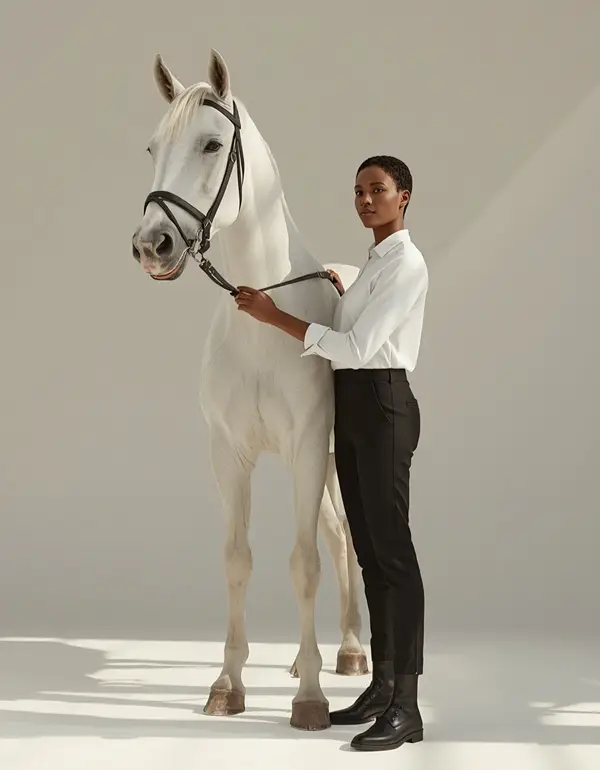
10. Cinematic Aesthetic Girl Portrait
SOFT / AESTHETIC
Best for: Girls, Instagram, aesthetic photography if you love Horse prompt then visit our post.
Use the uploaded image as the exact identity reference and preserve the girl’s facial features, skin tone, hairstyle, facial proportions, and identity exactly as shown, with no beautification, face reshaping, age alteration, or identity replacement. Retain visible pores, natural skin texture, minor imperfections, subtle facial asymmetry, and realistic hair strands, avoiding an AI-perfect or overly smooth appearance. Create a soft cinematic outdoor portrait surrounded by natural greenery during early evening, with warm sunlight entering from the upper right at approximately 30 degrees around 4800K and cool ambient sky fill around 6000K. Use an 85mm lens at f/1.8, shallow depth of field, creamy natural bokeh, realistic optical falloff, and sharp eyes. Preserve the physical texture and drape of the clothing, natural hair movement, and realistic leaves in the background. Give the subject a relaxed three-quarter pose with a subtle genuine smile. Use soft warm grading, muted greens, gentle highlights, and fine film grain in a 4:5 composition. Avoid excessive beauty filters, plastic skin, distorted hands, extra fingers, duplicated objects, text, logos, and watermark.
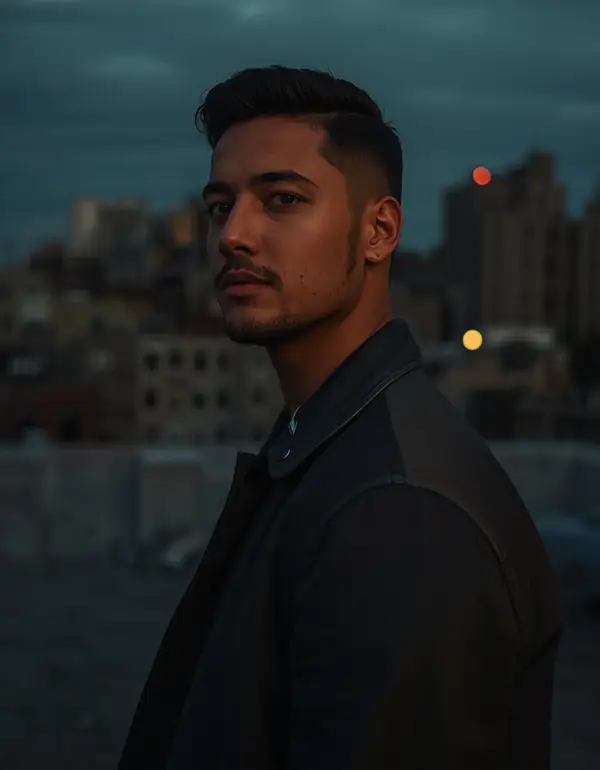
Use the uploaded photo as the exact identity reference and preserve the person’s facial structure, skin tone, hairstyle, natural proportions, and identity exactly, with no beautification, face reshaping, or identity modification. Retain pores, subtle skin texture, minor imperfections, natural asymmetry, and realistic hair detail rather than creating an AI-perfect face. Create a powerful cinematic portrait on a dark urban rooftop at dusk, with a warm 4500K sunset rim light coming from behind at approximately 20 degrees and a soft cool 6000K ambient fill from the front. Use a 50mm lens at f/1.8 with realistic shallow depth of field, natural perspective, and subtle atmospheric haze. Make the jacket, hair, concrete, and background architecture physically realistic with accurate texture and light response. Give the subject a natural upright stance, relaxed shoulders, and calm confident expression. Apply restrained teal and orange grading, controlled contrast, subtle film grain, and 4:5 portrait composition. Avoid superhero-like facial changes, exaggerated muscles, plastic skin, malformed hands, extra fingers, duplicate limbs, text, logos, or watermark.
12. Vintage Movie Still
RETRO / FILM
Best for: Retro photography and old-film aesthetics.
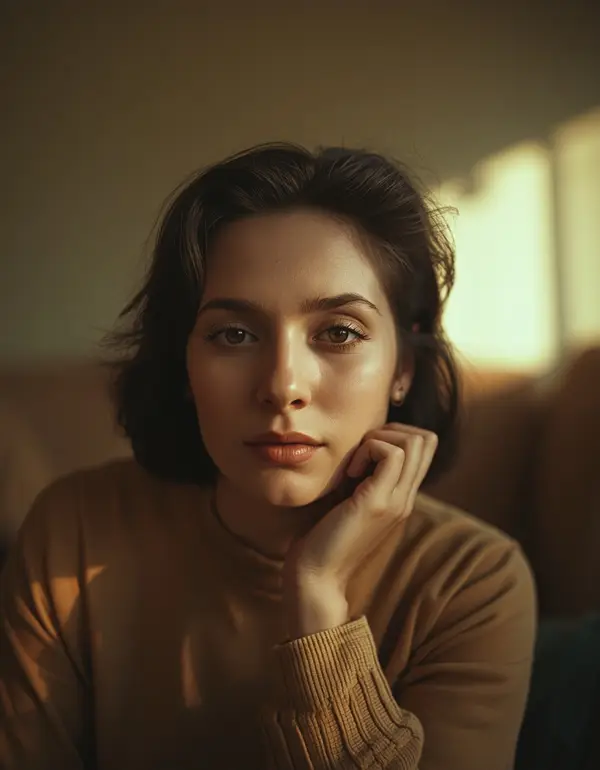
Use the uploaded photo as the exact identity reference and preserve the person’s original facial features, skin tone, hairstyle, proportions, and recognizable identity without beautification or alteration. Retain natural pores, fine skin texture, minor imperfections, facial asymmetry, and realistic hair detail while avoiding modern AI smoothing. Recreate the image as a believable 1970s-inspired cinematic film still inside a quiet interior, with warm tungsten light from the right at approximately 3200K and soft window daylight around 5200K entering from the left. Use a 35mm lens at f/2.0 with natural depth of field, realistic optical softness, subtle halation, and authentic film grain. Make the clothing, furniture, hair, and walls physically textured with natural wear and fabric detail. Pose the subject casually as if caught between moments, with a natural expression and imperfect posture. Use faded warm colors, gentle contrast, restrained grain, and 4:5 composition. Avoid excessive retro effects, distorted facial features, plastic skin, malformed hands, extra fingers, text, logos, or watermark.
13. Cinematic Close-Up
DETAILED / INTIMATE
Best for: Profile pictures, detailed facial photography.
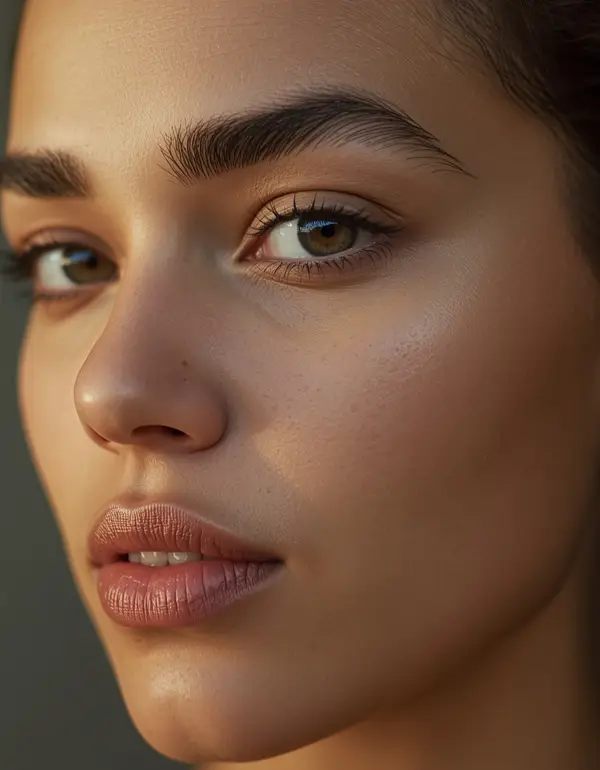
Use the uploaded portrait as the exact identity reference and preserve the person’s facial features, skin tone, eyes, nose, lips, face shape, hairstyle, and identity exactly without beautification, reshaping, or alteration. Keep natural pores, subtle skin texture, tiny imperfections, realistic facial asymmetry, and individual hair detail visible, avoiding artificial smoothing. Create an intimate cinematic close-up with a large soft key light positioned 45 degrees to the left at approximately 5000K and a very subtle warm 3200K rim light from behind. Simulate an 85mm lens at f/1.4 with extremely shallow but realistic depth of field, precise eye focus, natural skin rendering, and gentle optical falloff. Preserve realistic skin, hair, clothing, and background textures. Give the subject a calm, emotionally expressive gaze with a slight natural head turn. Use subdued cinematic color grading, soft highlight roll-off, subtle film grain, and 4:5 composition. Avoid over-sharpening, plastic skin, enlarged eyes, altered facial proportions, extra fingers, distorted hands, text, logos, or watermark.
14. Cinematic Black Outfit Portrait
FASHION / DARK AESTHETIC
Best for: Fashion edits, men and women, dark aesthetic.
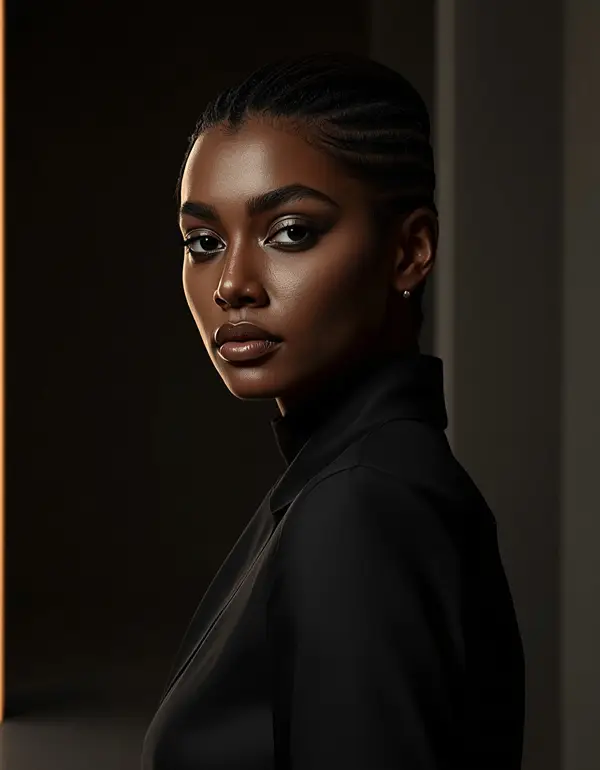
Use the uploaded photo as the exact identity reference and preserve the person’s facial features, skin tone, hairstyle, natural proportions, and identity exactly without beautification, reshaping, or alteration. Retain natural pores, subtle skin texture, minor imperfections, facial asymmetry, and individual hair strands, avoiding a digitally perfect face. Create a high-end cinematic fashion portrait with the subject wearing a simple matte-black outfit against a dark architectural background, illuminated by a narrow soft key light from the left at 45 degrees around 4300K and a controlled warm rim light from behind around 3000K. Use an 85mm lens at f/1.4 with shallow depth of field, realistic compression, precise focus, and subtle lens bloom. Make the black fabric physically realistic with visible weave, folds, and natural light absorption. Pose the subject naturally with one shoulder slightly turned and a composed expression. Use deep blacks, muted highlights, subtle grain, restrained contrast, and 4:5 composition. Avoid crushed facial detail, fake skin, exaggerated fashion proportions, malformed hands, extra fingers, text, logos, or watermark.
15. Cinematic Phone Photo Transformation
MOBILE / EVERYDAY
Best for: Mobile photography, ordinary selfies, quick AI edits.
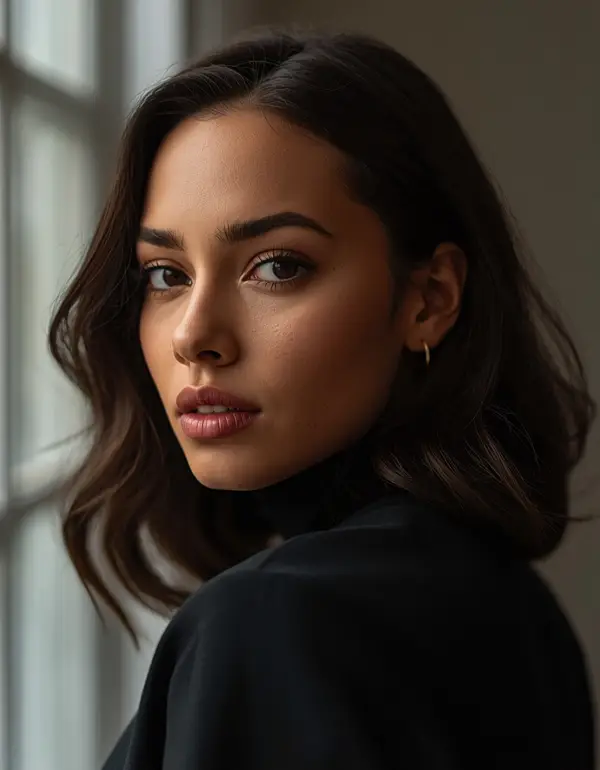
Use the uploaded phone photo as the exact identity reference and preserve the person’s face, skin tone, facial structure, hairstyle, proportions, and identity exactly without beautification or alteration. Keep natural pores, subtle skin texture, minor imperfections, facial asymmetry, and realistic hair detail so the result still looks like the same real person rather than an AI-generated model. Transform the ordinary mobile image into a professional cinematic photograph using soft late-evening window light from the left at approximately 45 degrees around 5000K, with gentle ambient fill from the room around 5600K. Simulate an 85mm lens at f/1.8 with natural depth of field, realistic background separation, optical bokeh, and professional highlight roll-off. Preserve physically accurate skin, hair, clothing, and environmental textures while removing the appearance of cheap phone processing without making the image artificial. Give the subject a relaxed natural pose and authentic expression. Use subtle cinematic color grading, gentle film grain, realistic contrast, and 4:5 Instagram composition. Avoid excessive HDR, oversharpening, plastic skin, distorted facial features, malformed hands, extra fingers, text, logos, or watermark.
16. Cinematic Travel Portrait
TRAVEL / OUTDOOR
Best for: Travel photography, outdoor images, Instagram posts.
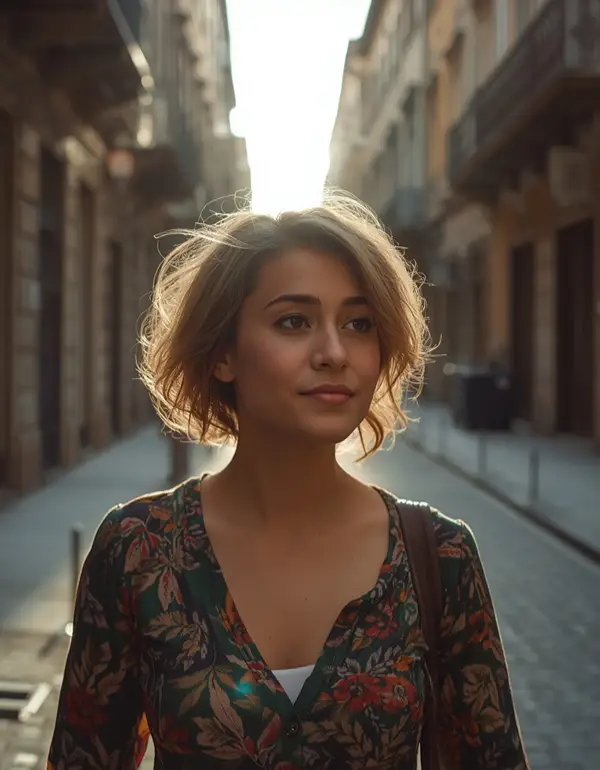
Use the uploaded photo as the exact identity reference and preserve the person’s facial features, skin tone, hairstyle, body proportions, and recognizable identity exactly without beautification, reshaping, or identity alteration. Retain natural pores, subtle skin texture, minor imperfections, facial asymmetry, and realistic hair strands. Create a cinematic travel portrait in a visually rich old city street during sunrise, with soft directional sunlight entering from the right at approximately 25 degrees around 4700K and cool open-sky fill around 6000K. Use a 35mm lens at f/2.0 with realistic environmental depth, natural perspective, moderate background separation, and documentary photography character. Make stone, wood, clothing, hair, and street surfaces physically detailed and believable. Pose the subject naturally while walking and looking slightly away from the camera, creating an unforced candid moment. Apply warm highlights, muted shadows, subtle film grain, gentle contrast, and 4:5 composition. Avoid artificial architecture, duplicated pedestrians, distorted hands, extra fingers, changed identity, text, logos, or watermark.
Each of these can be adjusted further — swap “she/he/they” references, add “preserve each individual’s separate identity; do not blend facial features” for a couple or group photo, or drop in a specific outfit description if you want the wardrobe to match a particular vibe.
How to use any prompt above on Gemini: open Gemini on your iPhone, Android, or in a browser; upload a clear, well-lit half-body or close-up photo of yourself (avoid extreme dark or blurry originals); paste the prompt right after the image; tap send/generate and give it 10-20 seconds to render. If the first output looks off, regenerate two or three times — Gemini’s output varies slightly on each attempt.
How to use any prompt above on ChatGPT: open the app or website and start a new chat; tap the + or image icon, choose Create Image, and upload your reference photo; paste the prompt directly into the message box; hit generate and wait for the render. If the result looks flat, ask ChatGPT to strengthen the lighting direction and lens compression as a quick follow-up edit rather than starting over.
How to Make Cinematic Photos Look More Realistic
A cinematic effect works best when it changes the visual language of the photograph instead of simply adding a dark filter. Focus on five areas:
Lighting: Tell the AI where the light comes from. “Soft light” is less useful than “soft window light from the left at 45 degrees.”
Lens: Use a lens that matches the shot. An 85mm lens is useful for portraits, while a 35mm lens gives more environmental context.
Depth: Ask for realistic depth of field rather than simply “blurred background.”
Texture: Natural pores, hair strands, fabric weave, skin variation, and film grain help prevent the synthetic look.
Color: Choose a controlled palette. Warm amber, muted green, cool blue, monochrome, and restrained teal-orange grading can create very different moods.
These details are consistent with current high-quality cinematic prompt guidance, which emphasizes lighting direction, lens choice, film texture, color grading, and mood rather than relying on the word “cinematic” alone.
Cinematic Editing With Gemini and ChatGPT
Both Gemini and ChatGPT can be used for image editing workflows when the relevant image feature is available. The important part is how you describe the edit.
For Gemini, prompts can be structured around the uploaded reference image, identity preservation, cinematic lighting, camera settings, and aspect ratio. Current Gemini-focused prompt collections commonly use image-to-image editing, specific lenses, lighting setups, and social-friendly crops.
For ChatGPT, use the same principles. Clearly identify the uploaded image as the identity reference, explain which visual elements should change, and explicitly state which elements should remain unchanged. A useful editing instruction is: preserve the subject exactly, change the lighting and environment, and do not redesign the person. This is more precise than simply asking an AI image generator to “make my photo cinematic.”
Getting Better Cinematic Results From a Phone Photo
You do not need a DSLR to create a cinematic AI edit. A clear mobile photograph can work well as the starting image.
Use a photo where the face is reasonably clear.
Avoid extremely low-resolution images.
Keep the original face unobstructed when possible.
Choose a pose that matches the cinematic scene.
Tell the AI which parts of the photo should remain unchanged.
Change one major visual element at a time if the first result is inconsistent.
If the output looks too artificial, strengthen the realism instructions rather than adding more style words. Ask for natural pores, realistic hair strands, physically accurate fabric, subtle film grain, realistic lens behavior, and restrained color grading.
Common Mistakes When Using Cinematic AI Prompts
Using only the word “cinematic.” A short prompt such as “make this cinematic” gives the generator too much freedom. The result may have dramatic colors but poor composition or unrealistic lighting.
Adding too many conflicting effects. A prompt containing neon, golden hour, black and white, heavy fog, blue lighting, red lighting, vintage film, HDR, and fantasy effects at the same time can produce an inconsistent image. Choose one primary visual direction.
Overusing 8K and HD. These words can communicate detail, but they do not automatically create realistic photography. Lighting, lens behavior, texture, composition, and color treatment are usually more useful.
Forgetting identity preservation. For an editing workflow, always make it clear that the uploaded person is the identity reference. Otherwise, the generator may unintentionally change facial structure.
Making the skin too perfect. One of the easiest ways to make an AI portrait look fake is excessive smoothing. Natural pores, subtle asymmetry, minor imperfections, and realistic texture are important for believable results.
Ignoring composition. Specify 4:5 for many Instagram portraits, 9:16 for vertical social content, 1:1 for square posts, or another format appropriate to the final use.
Can You Use Cinematic Prompts for Photography?
Yes. Cinematic prompting can also improve photography planning before you take a photo. Instead of thinking only about the subject, think like a photographer: where is the main light, what is the background doing, what focal length fits the scene, should the subject look at the camera, how much background should remain visible, what color temperature fits the mood, and should the image feel warm, dark, nostalgic, romantic, or tense.
This turns a basic photography idea into a more controlled visual concept. For mobile photography, you can also use these concepts when deciding how to shoot photos with a phone — look for directional light, clean backgrounds, natural poses, and interesting foreground or background layers before relying on editing.
Frequently Asked Questions
What is a cinematic photo prompt?
A cinematic photo prompt is a detailed AI instruction for creating or editing an image with movie-like lighting, camera depth, color grading, composition, texture, and mood.
What is the best cinematic photo prompt for Gemini?
The best prompt depends on the scene, but a strong Gemini prompt should include identity preservation, lighting direction, camera and lens language, realistic texture, mood, composition, and negative instructions. Gemini-focused cinematic prompt collections commonly use these elements for portrait editing.
Can I use these prompts with ChatGPT?
Yes. The prompts are written as general image-editing instructions, so they can be adapted for ChatGPT and other AI image tools that support image generation or editing.
How do I make an AI photo look cinematic?
Use specific lighting, lens, depth of field, color grading, film texture, composition, and mood instructions. Do not rely only on words such as “cinematic” or “8K.”
What lens should I use for cinematic portraits?
An 85mm lens look is a strong choice for close portraits because it creates natural facial perspective and background separation. A 50mm lens is useful when you want more of the environment visible.
What aspect ratio is best for Instagram cinematic photos?
A 4:5 portrait format is a practical choice for standard Instagram feed photography, while 9:16 works better for vertical Stories, Reels covers, and full-screen social content.
Can I turn a normal phone photo into a cinematic image?
Yes. A clear phone photo can be transformed by changing the lighting, environment, depth of field, color grading, and photographic character while preserving the original person.
Why does my cinematic AI photo look fake?
The most common causes are excessive skin smoothing, unrealistic lighting, poor hand generation, overdone color effects, and vague instructions. Add natural texture, realistic light direction, specific camera language, and clear negative instructions.
Can I create black and white cinematic photography with AI?
Yes. Ask for a monochrome film treatment with controlled highlights, deep but detailed shadows, realistic skin texture, subtle grain, and a specific lighting setup.
Conclusion
A good cinematic photo prompt does more than ask an AI generator to make an image look like a movie. It gives the model a complete visual direction covering identity, lighting, lens, depth, texture, composition, color, and mood. For the most realistic results, start with a clear reference photo, protect the person’s identity, choose one cinematic style, and describe the lighting and camera behavior precisely. Whether you want a dark male portrait, romantic couple photo, monsoon scene, black-and-white image, bike edit, wedding portrait, or aesthetic Instagram post, the right prompt can turn an ordinary image into a much more polished cinematic scene.
The key is specificity without overload. A well-structured cinematic photo prompt gives the AI enough information to understand the intended photograph while leaving enough flexibility for a natural-looking result.